
Free Kahoot-Style Quiz Maker
Opinion Stage is a free Kahoot-style quiz maker that lets you build interactive quizzes, trivia games, and knowledge tests — without time limits, question-type restrictions, or coding. Start from a template, generate a full quiz with AI, or build one from scratch with skip logic, visual analytics, and embeddable sharing.
Comparing tools before you commit? See our full breakdown of the best Kahoot alternatives in 2026.
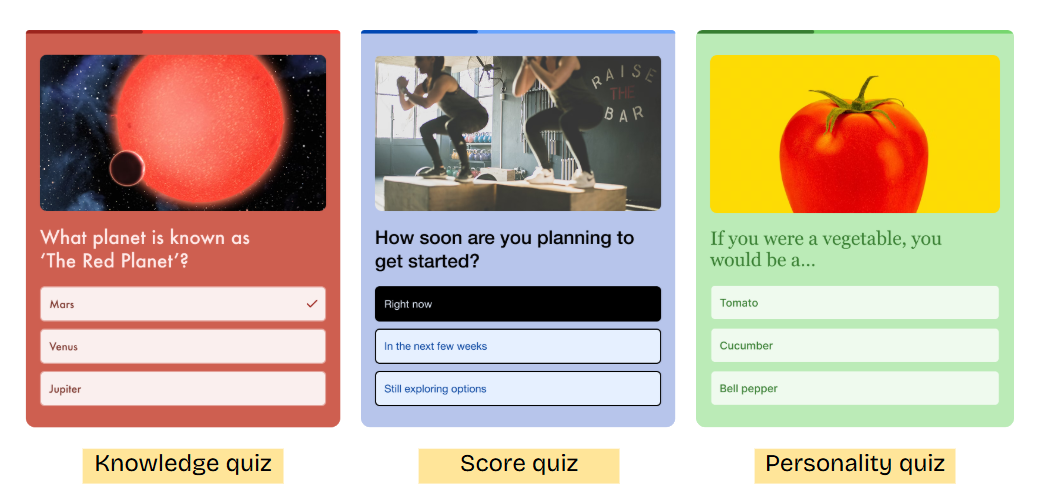
1. Choose your quiz type
Start from scratch, use a template, or let the AI quiz maker generate one from a topic. Select Trivia, knowledge test, personality, or product recommendation.
2. Add your questions
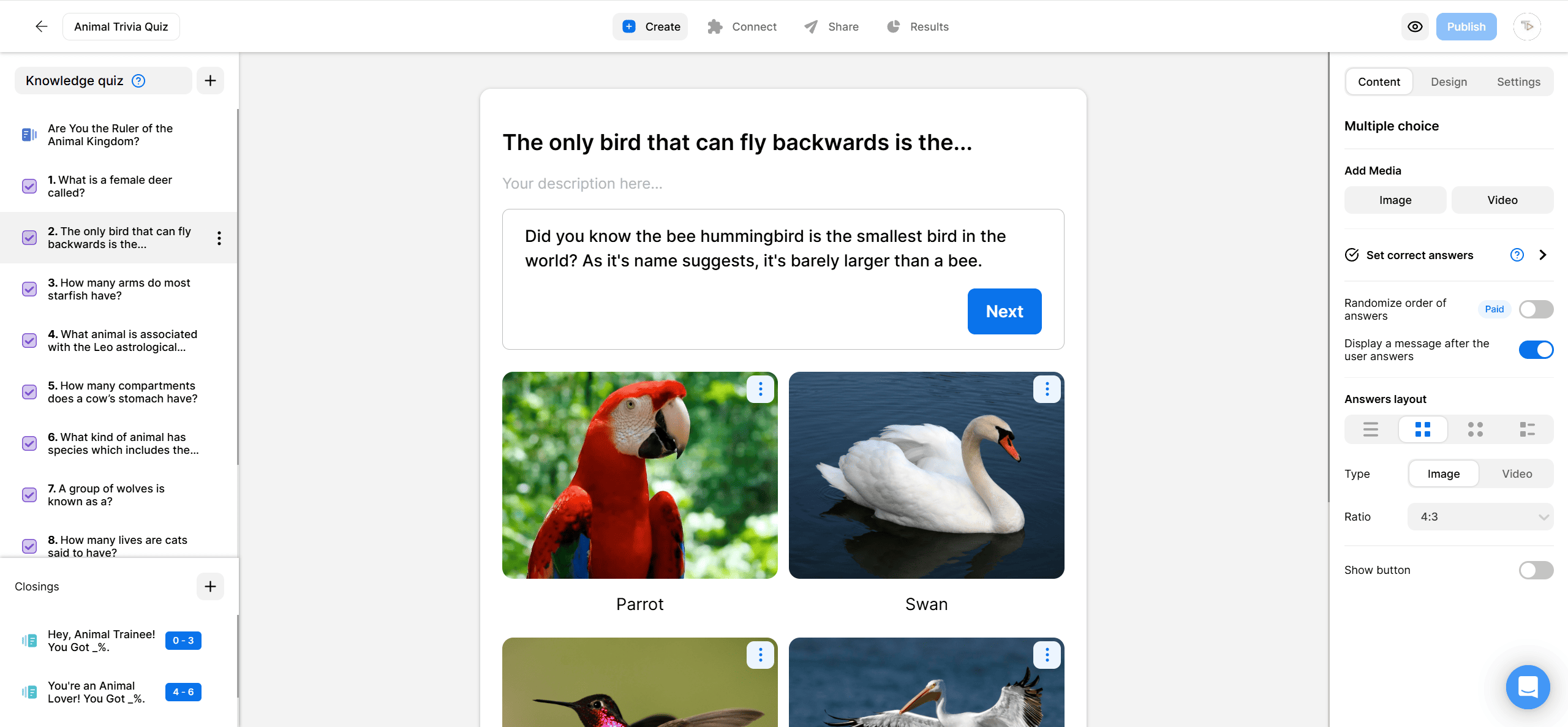
You can select between many different question types – multiple choice, true/false, image-based, or open-ended. Add images and videos directly to answer options. Set correct answers and point values.
3. Customize the experience
Apply skip logic so each participant gets a personalized path. Add a lead capture form. Choose your color theme and branding.
4. Share and track results
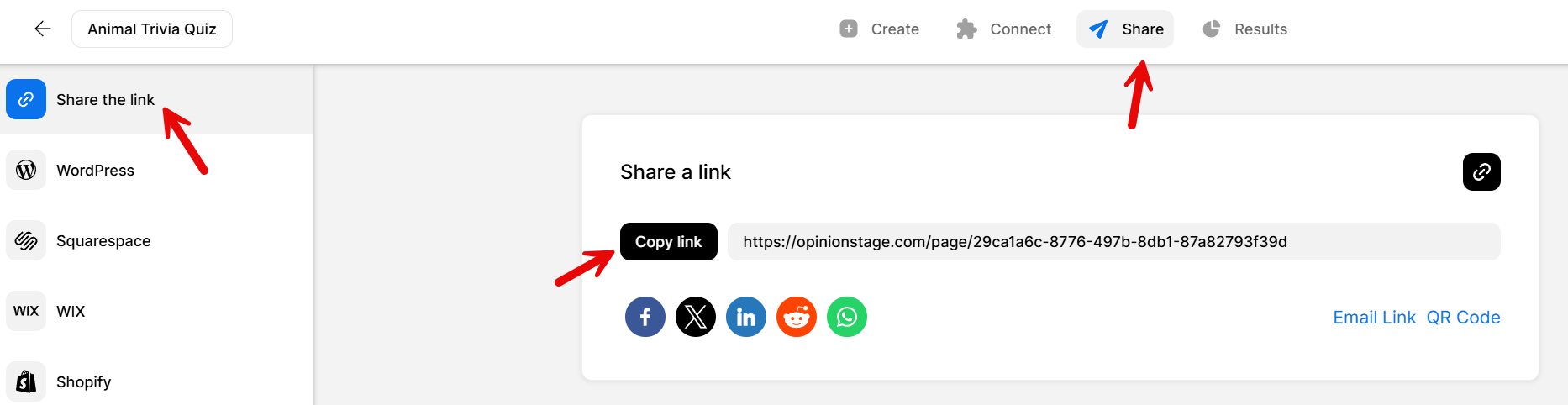
Copy the link, embed on your site, or share on social. Monitor completions, scores, and drop-off in the visual analytics dashboard.
Why Opinion Stage beats Kahoot for quiz creation
Kahoot is great for quick-fire classroom games — but if you need more depth, flexibility, or professional polish, it falls short. Here’s where Opinion Stage fills the gaps.
No time pressure — let participants think
Kahoot forces a countdown timer on every question. That works for simple trivia but falls apart when you need thoughtful, multi-step questions that require research or reflection. With Opinion Stage, quizzes are self-paced by default. Participants can take as long as they need, making it a better fit for real assessments, employee training, and complex knowledge tests. You can add answer explanations to every question so participants learn as they go — not just race against a clock.
Every question type you need
Kahoot limits you to four basic question formats. Opinion Stage gives you 10+ question types — multiple choice, true/false, image-based, open-ended, rating scales, and more. Combine different types in a single quiz to keep things interesting, or create automatically scored quizzes that grade themselves. You can add images and videos directly to answer options, not just to question stems, so every question becomes a visual experience. No coding required.
Professional design for any context
Kahoot’s colorful, game-show aesthetic works in a classroom but feels out of place in a corporate training, marketing campaign, or client-facing assessment. Opinion Stage lets you customize fonts, colors, and layouts to match your brand. Choose a cover image that pulls people in, apply a consistent color theme, and the result looks polished on any screen — from a conference room smartboard to a phone on the subway.
Personalized quiz experiences with skip logic
Kahoot shows every participant the same questions in the same order. Opinion Stage lets you build branching quiz paths — where the next question depends on the previous answer. This means you can create personalized experiences: a product recommendation quiz that adapts to preferences, an assessment that skips sections a participant has already mastered, or a lead generation quiz that routes prospects to different outcomes based on their responses.
Real analytics, not just scores
Kahoot gives you a scoreboard. Opinion Stage gives you a full analytics dashboard — visual pie charts and bar graphs showing answer distributions, completion rates, drop-off points, average time spent, and per-submission detail. Every submission triggers an email notification so you’re never out of the loop. Export the data when you need it, or use the built-in reports to identify your quiz competition winner, gauge group performance, or spot which questions need reworking.
No live session required
Kahoot requires everyone to join at the same time. Opinion Stage works asynchronously — share a link via email, WhatsApp, or social media, embed the quiz on your website, or drop it into a presentation. Participants take it whenever and wherever works for them. That makes it ideal for marketing quizzes on landing pages, self-paced employee onboarding, or homework assignments where students complete the quiz on their own schedule. You can even generate a full quiz with AI and have it live in seconds.
Free quiz maker like Kahoot — what you get for $0
You don’t need a paid plan to create Kahoot-style quizzes with Opinion Stage. The free plan includes unlimited quiz creation, AI quiz generation, 100+ templates, and no credit card to get started. Build trivia quizzes, knowledge tests, or personality quizzes — add images to every question and answer, apply skip logic, and embed the finished quiz on any website.
The main limitation on the free plan is response volume — you get a set number of submissions per month, which is more than enough for classroom quizzes, team meetings, or testing a quiz funnel before upgrading. There’s no time limit on how long your quizzes stay live, and no feature gating on question types or analytics.
Want to see how Opinion Stage stacks up against Kahoot and other tools feature by feature? See our full Kahoot alternatives comparison.
Ready to get started?
Create a QuizMakes Every Quiz an Exciting Visual Experience
Keep your audience engaged with visually-appealing quizzes.
- Start with a cover image that will pull people in and make them curious.
- Add images, gifs, and videos to every question to keep them entertained and help them remember.
- Experiment with different layouts. Add one image to a question or multiple images to your answer options.
- Choose a color theme that complements your topic and visual choices.
- And don’t worry about image quality, we make sure everything looks great everywhere and all the time.
Advanced Features, Zero Coding
Create a unique quiz experience customized to your needs and personalized to your audience without writing a single line of code.
- Combine a variety of question types.
- Create automatically scored quizzes.
- Block cheating or repeat voting.
- Build quizzes that offer different question paths based on the participants’ answers.
All these features and more are at your fingertips. No learning curve, and no complications, simply dive in and start experimenting.
Safe, Secure & Private
Your data is safe with us! All the feedback you collect with Opinion Stage is securely stored on Amazon AWS servers in the cloud. We follow strict industry security and privacy standards to verify that your information is never compromised. Regular security assessments and audits are also performed to verify that your data is always secure.
Relaxing & Pressure-Free
While timed contests are fun for some others may find them daunting. Use our quizzes to create a calm learning atmosphere without the pressure of time limits and high competition.
- Give your students a multiple-choice quiz that requires some thought and research, or let them deal with longer questions that require more time to figure out.
- Add answer explanations to every question and use them to offer additional knowledge and external links after they select an answer.
- Let them take the same quiz as many times as they like to build their confidence and comfort with the new material they’re learning.
5 Pro Tips to Make Your Kahoot Quiz Excel
Making a good Kahoot quiz is easy but if you want to make it shine above the rest, follow these quick tips.
1. Choose The Right Images
Image quizzes work much better than quizzes that are fully text-based because they keep people entertained and focused. But you need to make sure you’re choosing the right types of images so that they don’t compete with your questions or cause confusion or bias.
- Choose images that illustrate your questions and answer options or add another layer of meaning to them.
- Make sure your images don’t disclose the right answer (in a trivia quiz) or make one answer option look better than others (in a personality quiz).
- Select images that are bright and clear. Too many details could draw people away from the questions.
- Always opt for higher-quality images. We ensure that images always stay sharp, but if the quality is low big screen display could be small.
- Try to choose one style and stick with it throughout your quiz to offer a unified experience. For example, only illustrations, or only photos.
2. Don’t Try to Trick Your Quiz Takers
If your goal is to inspire learning and offer an empowering experience, ditch the trick questions. There are many other fun and challenging types of quizzes and questions to choose from.
Ensure that your audience is engaged and entertained all the way through by writing the questions (and answer options) in coherent, simple language.
To avoid confusion, make sure you’re asking only one question at a time and that each answer option is clearly different from the others.
3. Use Humor
A good way to keep the engagement level high during your Kahoot quiz is to use humor whenever possible. Even if you’re asking about a serious topic, try to find creative and tasteful ways to add humor to your quiz questions.
You don’t have to be goofy or try to make your students laugh necessarily. Sometimes humor is more about being less formal and choosing a friendlier tone. For example, you could use funny GIFs or memes instead of regular photos.
Using humor in your quiz shows your audience that you have a personality and that you’re on their side, which builds trust and closeness, making it more of a joint experience and less of a scary test.
4.Write the ‘Right’ Wrong Answers
Make sure that the correct answers don’t stand out by sticking to a similar style and format in all your answer options. Also, keep in mind that the length of the incorrect answer options should remain consistent throughout the quiz.
When our brain tries to solve problems, it looks for patterns and clues. Answers that look similar to each other can make it more difficult for your audience to guess the correct answer.
5. Ask for Feedback
When you’ve finished writing your Kahoot style quiz, ask one of your colleagues for constructive feedback. Sometimes questions and answers that are clear to you are not so clear to others. There might be images in the quiz you like that others don’t.
You can also ask for feedback from your quiz takers to find out what they really thought of the quiz. This can be done by simply adding the feedback question at the end of your quiz with our quiz tools.
FAQ
Is there a free quiz maker like Kahoot?
Yes, Opinion Stage offers a free quiz maker with unlimited quiz creation, AI generation, and no credit card required. Unlike Kahoot’s free plan, it includes skip logic, lead capture, and website embedding.
What's the difference between Kahoot and Opinion Stage?
Kahoot is designed for live, time-pressured group play. Opinion Stage is built for flexible quiz creation — participants can take quizzes at their own pace, on any device, embedded on any website. It supports more question types, skip logic, and visual analytics.
Can I create a Kahoot-style quiz without Kahoot?
Yes. Opinion Stage lets you build Kahoot-style trivia quizzes, knowledge tests, and personality quizzes with a drag-and-drop builder. You can add images, videos, scoring, and leaderboards — without needing a Kahoot account.
What is the best free Kahoot alternative for businesses?
Opinion Stage is the most popular free Kahoot alternative for business use cases. It supports lead capture, branded quiz design, skip logic, and integration with marketing tools like HubSpot, Mailchimp, and WordPress.
Can I embed a Kahoot-style quiz on my website?
Kahoot doesn’t support website embedding on its free plan. Opinion Stage lets you embed quizzes on any website — WordPress, Wix, Squarespace, Shopify, or any custom site — with a simple embed code.
It takes Minutes to Get Up and Going
Create a Quiz