
Shopify Quiz Maker: Add Interactive Quizzes to Boost Sales
Create a quiz with Opinion Stage and embed it on any Shopify store page. No app install required.
- ✓ Free to use
- ✓ No credit card needed
How to Add a Quiz to Your Shopify Store
Shopify doesn’t have a built-in quiz builder, so most merchants add one through the Shopify App Store. With Opinion Stage, you can build your quiz once and embed it directly into any Shopify page using an embed code. There’s no extra app to manage, and the same quiz can also be used on your blog, social channels, and in email campaigns.

2. Copy the embed code
Click on the Share button located at the top of your screen and then click on the Shopify tab. Copy the embed code.

3. Go to your Shopify store
Log in to your Shopify account, go to the dashboard, and click on Pages. This is located on the left-hand side of your admin screen. Add a new page or navigate to an existing one, depending on where you want to embed your quiz.
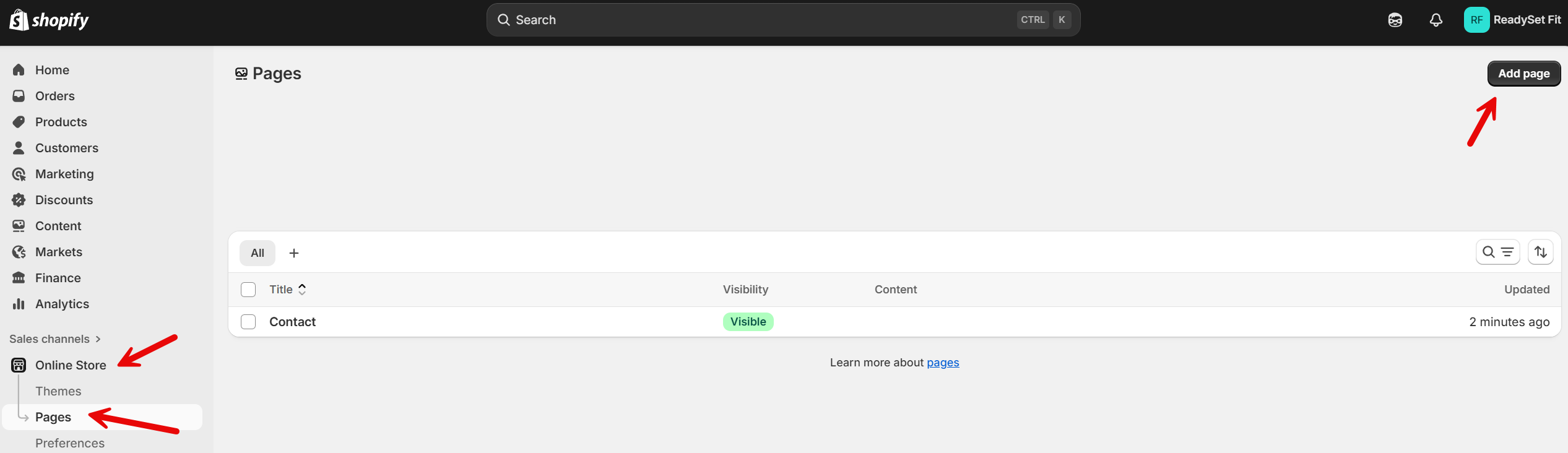
4. Paste the code
Click on the <> icon and paste in the embed code you copied earlier. Don’t forget to click Save.

Your quiz should now look like this:

And that’s it, you’re done!
Why Add a Quiz to Your Shopify Store?
A quiz can do more than add an interactive element to your Shopify store. It can help shoppers find the right products, give you useful insight into their preferences, and create more opportunities to turn visitors into customers.
🛍️ Help shoppers find the right product: A product recommendation quiz asks a few questions about a shopper’s needs and preferences, then guides them toward products that fit. This makes it easier to choose when your store offers a lot of options.
📧 Capture leads with useful context: Add a lead form before the results to collect email addresses along with the shopper’s quiz responses and product preferences. This gives you more useful information for future marketing and follow-up.
💡 Learn what your shoppers want: Response data shows you which preferences and products come up most often, giving you insights you can use to improve your product selection, messaging, and recommendations.
🛒 Help shoppers move toward a purchase: A personalized recommendation can help undecided shoppers narrow down their options and find a product that fits, making it easier to take the next step toward checkout.
Quiz Types to Add to Your Shopify Store
Different quiz formats can help you engage shoppers at different stages of their buying journey. Use them to help visitors discover products, learn more about your brand, or find recommendations tailored to their needs.
🧠 Personality Quiz
A personality quiz is best for creating a fun product discovery experience. It gives shoppers a result based on their answers, such as a style, personality type, or preference, and you can connect each result to relevant products or collections. Try ideas like “Which Coffee Personality Are You?” or “What’s Your Home Decor Style?” to make browsing more interactive.
🎯 Knowledge Quiz
A knowledge quiz can turn your brand or products into a fun challenge. It tests shoppers on your products, industry, or brand, and you can offer a coupon or prize as an incentive to participate. It’s a good way to engage visitors without making the quiz directly about choosing a product.
🛍️ Product Recommendation Quiz
A product recommendation quiz helps shoppers decide what to buy. It asks about their needs, preferences, budget, or intended use, then recommends the products that best match their answers. This works especially well when shoppers have several similar products to choose from and need help narrowing down their options.
Opinion Stage Features for Shopify Quizzes
Build quizzes that fit your Shopify store, collect useful shopper data, and turn responses into actionable insights. Opinion Stage gives you the tools to easily create, customize, share, and measure your quizzes.
- AI quiz builder: Describe what you want to create and generate a quiz in under a minute.
- Customizable templates: Start with ready-made personality, knowledge, and product recommendation quizzes instead of building from scratch.
- Lead forms and 100+ integrations: Add a lead form to collect shopper details and connect responses with tools such as Klaviyo, Mailchimp, HubSpot, Zapier, and your CRM.
- Full design customization: Adjust colors, fonts, layouts, and other design elements to match your Shopify store. You can also remove Opinion Stage branding with white labeling and use advanced customization options, including custom CSS, for more control over your quiz’s appearance.
- Real-time analytics: See views, completions, drop-offs, and answer breakdowns as responses come in, helping you understand how shoppers interact with your quiz.
See all Opinion Stage quiz maker features.
Shopify Quiz FAQ
Can I add a quiz to my Shopify store without installing an app?
Yes. Opinion Stage isn’t a Shopify App Store app. You build your quiz in Opinion Stage, then embed it directly into any Shopify page using a simple embed code. There’s no app to install or manage in your Shopify admin.
Is Opinion Stage free to use with Shopify?
Yes. Opinion Stage offers a free plan with unlimited quizzes and questions, AI quiz generation, and lead capture. You can embed quizzes on Shopify without a credit card. Paid plans give you higher response limits along with additional customization and other advanced features.
Can I collect leads from a Shopify quiz?
Yes. You can add a lead form to your quiz to collect email addresses along with each shopper’s answers and preferences. You can connect your quiz to tools such as Klaviyo, Mailchimp, HubSpot, and Zapier to send leads where your team already works.
What is the best quiz app for Shopify?
That depends on what you need. Shopify App Store apps are installed directly in your store, while an embeddable quiz maker like Opinion Stage lets you build quizzes separately and add them to any Shopify page. The same quiz can also be reused on your website, blog, social channels, and email campaigns, which can be useful if you want to use your quizzes beyond your Shopify store.
Other Ways to Engage Your Shopify Audience
- Shopify Poll: Get quick feedback with visual polls that let shoppers share their opinions in just a few clicks.
- Shopify Survey: Collect more detailed customer feedback with surveys that cover multiple questions, preferences, and experiences.