
Squarespace Form Builder: Create Any Form for Your Site
Build a custom Squarespace form with Opinion Stage’s form builder and embed it on any page of your site to collect contact details, signups, feedback, and more. No code needed.
- ✓ Free to use
- ✓ No credit card needed

How to Add a Form to Your Squarespace Site
Squarespace’s built-in forms work for basic contact and signup pages. For conditional logic, multi-step flows, or form analytics, you’ll want a dedicated form builder. Here’s how to add one with Opinion Stage in four steps.

2. Copy the embed code
Click on the Share button at the top of your screen and then click on the Squarespace tab. Copy the embed code.

3. Add the form to Squarespace
You have two options for embedding it on your Squarespace site. You can either add it to a new page or embed it on an existing page. If you’d like to add your form to a new page, create the new page first, then follow the steps below to embed the form.
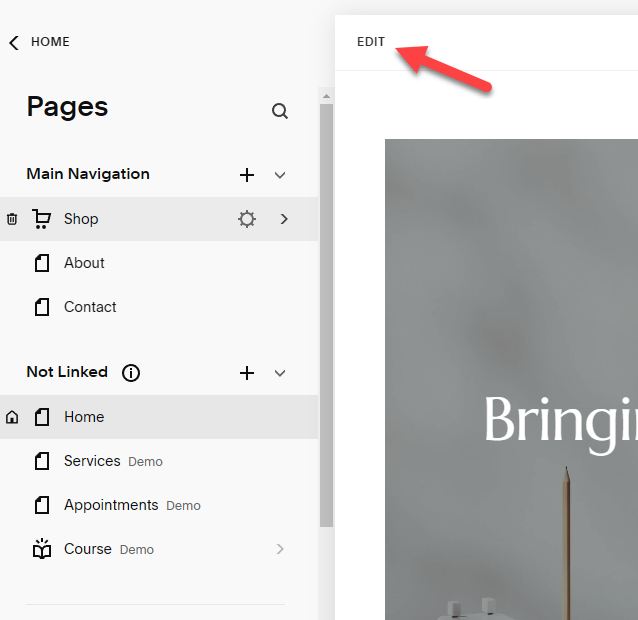
Start by clicking Edit at the top left-hand corner.
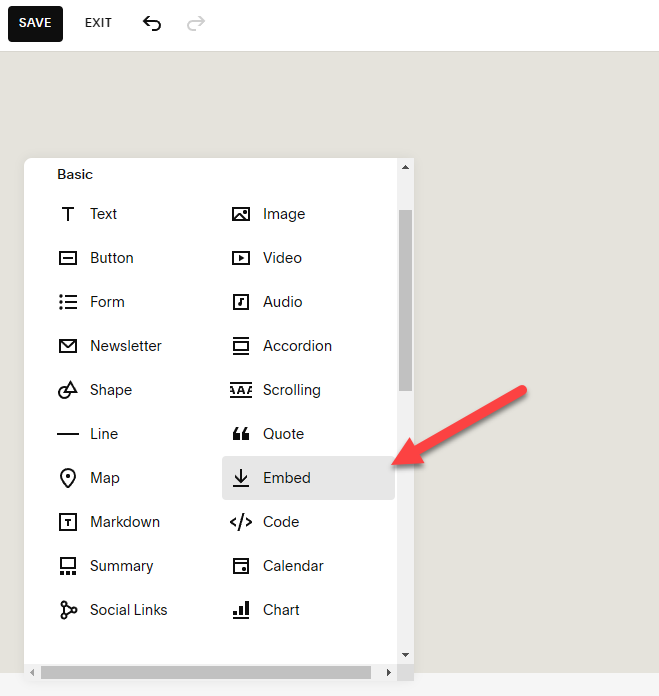
Then, click +Add Block on the left-hand side and scroll down to find the Embed button.
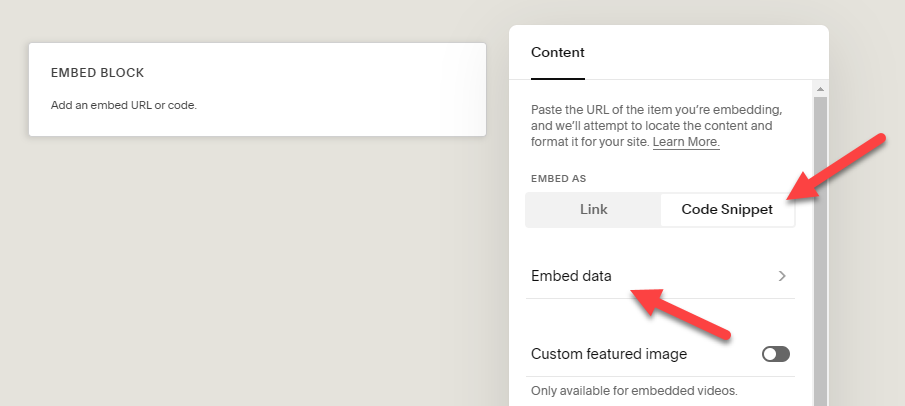
Squarespace will now add an embed block to the page. Double-click it to open up the Content menu. Next, click on Code Snippet and then Embed data.
Paste your form’s Squarespace embed code into the box. If you want to reposition your form, just click and hold, then drag it to where you want on the page. Don’t forget to click Save.
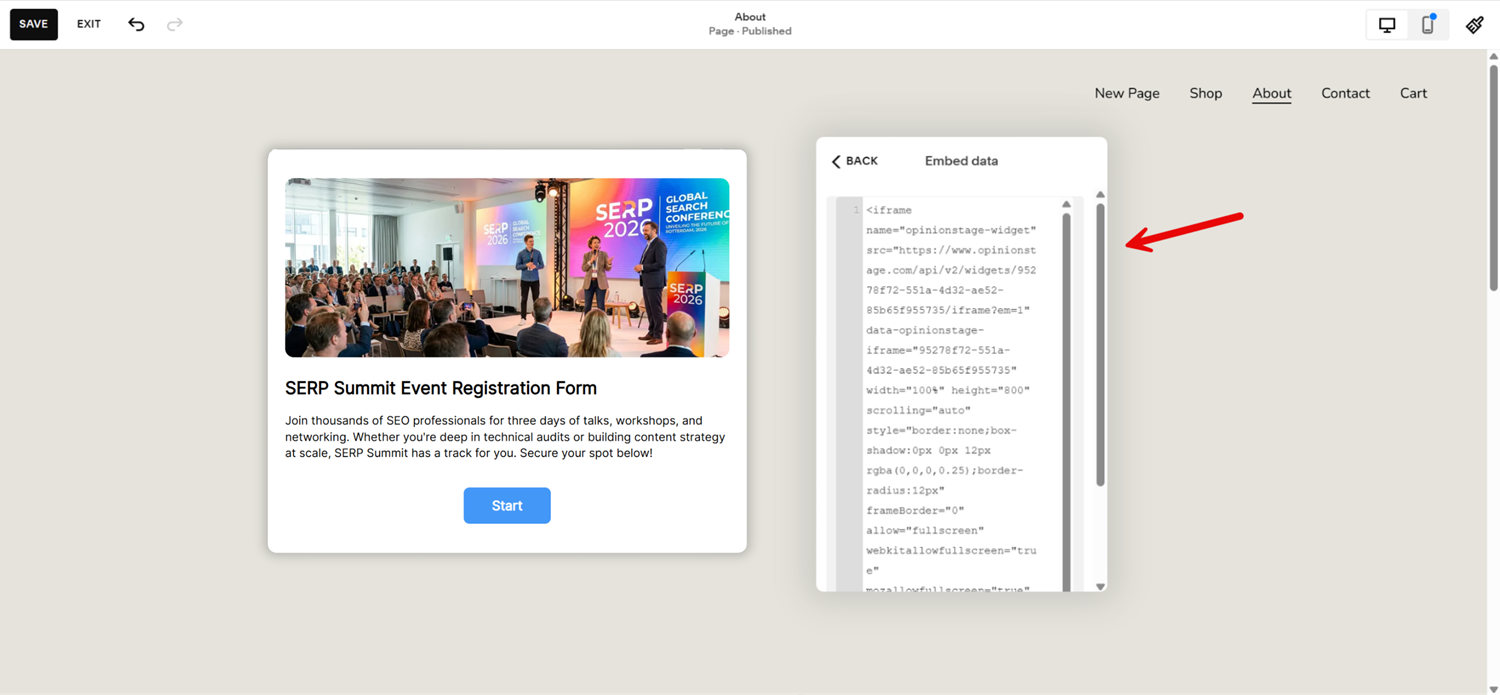
And now you’re done!
Why Use Opinion Stage’s Form Builder on Squarespace
Squarespace’s built-in forms cover the basics, such as name, email, or message, but they fall short the moment you need a form that adapts to answers, runs across multiple steps, or shows you where visitors drop off. Opinion Stage’s form builder gives you all of that in a block you can embed anywhere on your Squarespace site.
What you get:
- 100+ templates for contact, registration, feedback, application, RSVP, booking, and event signup forms that are customizable to any use case.
- Conditional logic that shows or hides fields based on previous answers.
- Custom design that matches your Squarespace site’s fonts, colors, and brand.
- 100+ integrations with Mailchimp, HubSpot, Salesforce, ActiveCampaign, Zapier, and other tools.
- Real-time analytics – see submission rates, drop-off points, and field-level completion.
- Mobile-optimized out of the box, which matters because most Squarespace traffic is mobile.
See all Opinion Stage form maker features.
Best Practices for Squarespace Forms
A form is only useful if people actually fill it out. Here are five things that make the difference between a form that converts and a form your visitors scroll past.
Keep it Short
The fewer fields you ask for, the higher your submission rate. For a contact or signup form, name and email are usually enough. Add optional fields only if you’ll actually use the data.
Place it Above the Fold
Embed the form where visitors will see it without scrolling – on your homepage hero, contact page, or at the top of a Squarespace landing page. For multi-page visibility, pin it to your Squarespace announcement bar.
Match Your Brand
Use Opinion Stage’s design controls to match your Squarespace site’s fonts, colors, and button style. A form that looks native to your site converts better than a generic embed.
Connect it to Your Stack
Send submissions straight to your email tool, CRM, or spreadsheet. Opinion Stage integrates with Mailchimp, HubSpot, Google Sheets, Zapier, and hundreds of other tools.
💡 Pro Tip: Set this up before you launch the form, not after.
Test Before You Publish
Test your form before publishing to make sure everything works as it should. You can do this by clicking on Share and scrolling down to your form.
Squarespace Form FAQs
How do I create a contact form on Squarespace?
Pick a contact form template in the Opinion Stage template library, customize the fields if needed, and copy the Squarespace embed code from the Share menu. Paste it into a Code block on your contact page and the form is live. You can route submissions to your inbox, CRM, or both.
Can I add a custom form to Squarespace without coding?
Yes. Opinion Stage’s form builder generates a Squarespace-ready embed code that you paste into a standard Code block. No HTML, CSS, or JavaScript knowledge is needed.
Does Squarespace have a built-in form builder?
Squarespace includes a basic form block for simple contact and signup forms. For anything more advanced, such as conditional logic, multi-step flows, or detailed form analytics, you need a dedicated form builder like Opinion Stage.
Where do my Squarespace form submissions go?
Submissions land in your Opinion Stage analytics dashboard, where you can see every response, sort and filter them, and export to CSV. You can also route submissions automatically to your email, CRM, Google Sheets, or any of 100+ connected tools. Set up the routing when you build the form, and submissions will flow there in real time.
Is the Opinion Stage form builder free?
Yes. You can create and embed unlimited forms on Squarespace with Opinion Stage’s free plan. Paid plans add more responses, advanced customization, and removal of Opinion Stage branding.
Can I use my Squarespace form with Mailchimp?
Yes. Connect your Mailchimp account in Opinion Stage, and every form submission adds the contact to the list of your choice (along with their answers), which you can map to Mailchimp custom fields or tags for segmentation. The same works for HubSpot, Salesforce, ActiveCampaign, and dozens of other email and CRM tools.
Will the form work on mobile Squarespace sites?
Yes. Forms are responsive by default and adapt to any Squarespace template, including mobile and tablet breakpoints.
Can I embed a Google Form or Typeform in Squarespace instead?
Yes, both work on Squarespace. The catch is that Google Forms has limited design customization, so the embedded form looks distinct from your Squarespace branding. Typeform is built around a full-screen format, which works well for standalone forms, but is less flexible when you want a form embedded directly into a Squarespace page. Opinion Stage embeds inline with full design control, so the form lives inside your page and matches your site’s branding.
Other Ways to Connect With Your Squarespace Audience
Need something other than a form? Opinion Stage has dedicated builders for every interactive content format:
- Squarespace Quiz: Recommend products, test knowledge, or build personality quizzes.
- Squarespace Poll: Ask quick questions and gather opinions from your visitors.
- Squarespace Survey: Collect detailed feedback with branching logic.