
Add an HTML Poll to Your Site in Seconds
An HTML poll is a poll widget you embed on a website using a small snippet of code. Visitors vote directly on the page and results update in real time. Opinion Stage’s HTML poll maker generates the embed code automatically – no JavaScript or backend setup required – so any poll you build can be added to a website, blog, or landing page in seconds.
How to Create an HTML Poll in 3 Steps
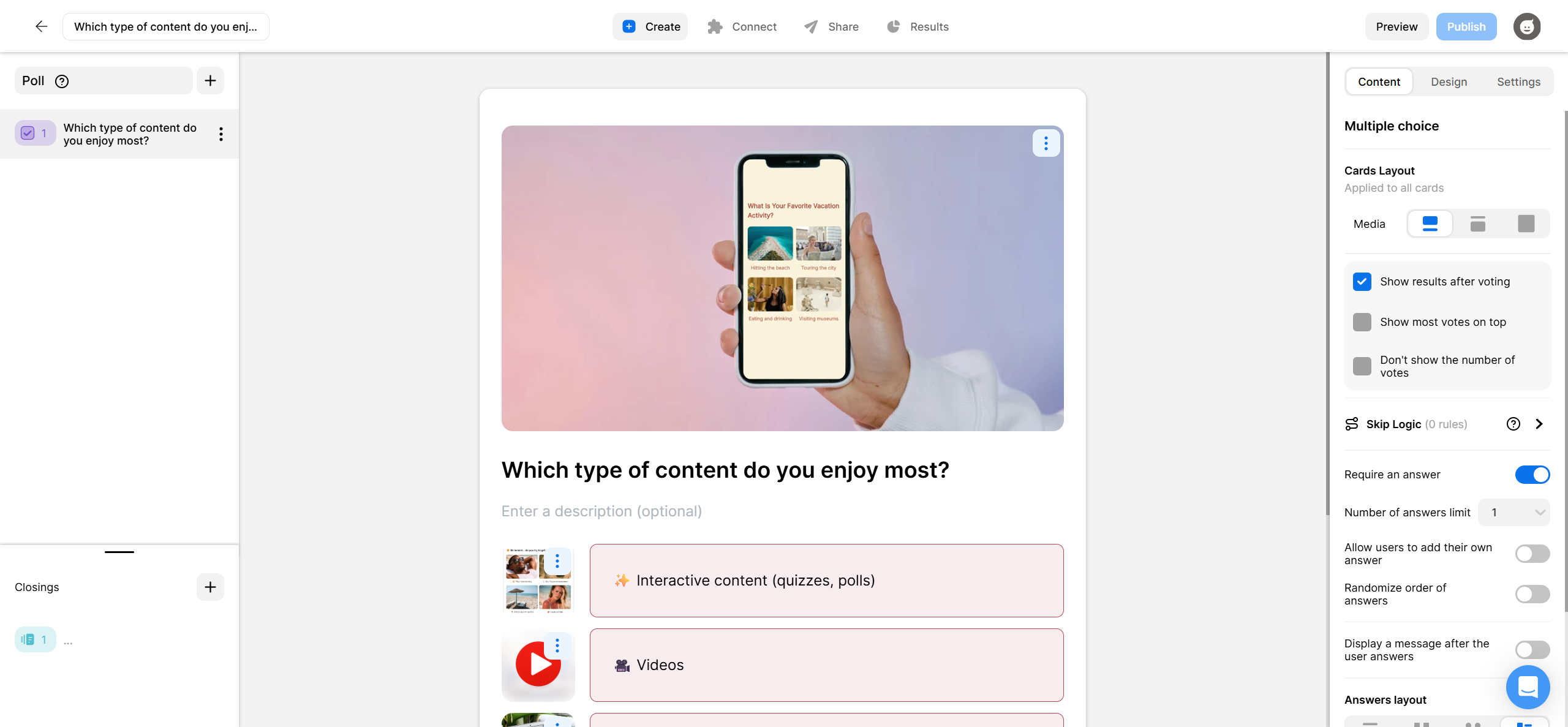
Building an HTML poll with Opinion Stage takes just three steps. Here’s how to add a visual, engaging poll to your site.
2. Copy the code
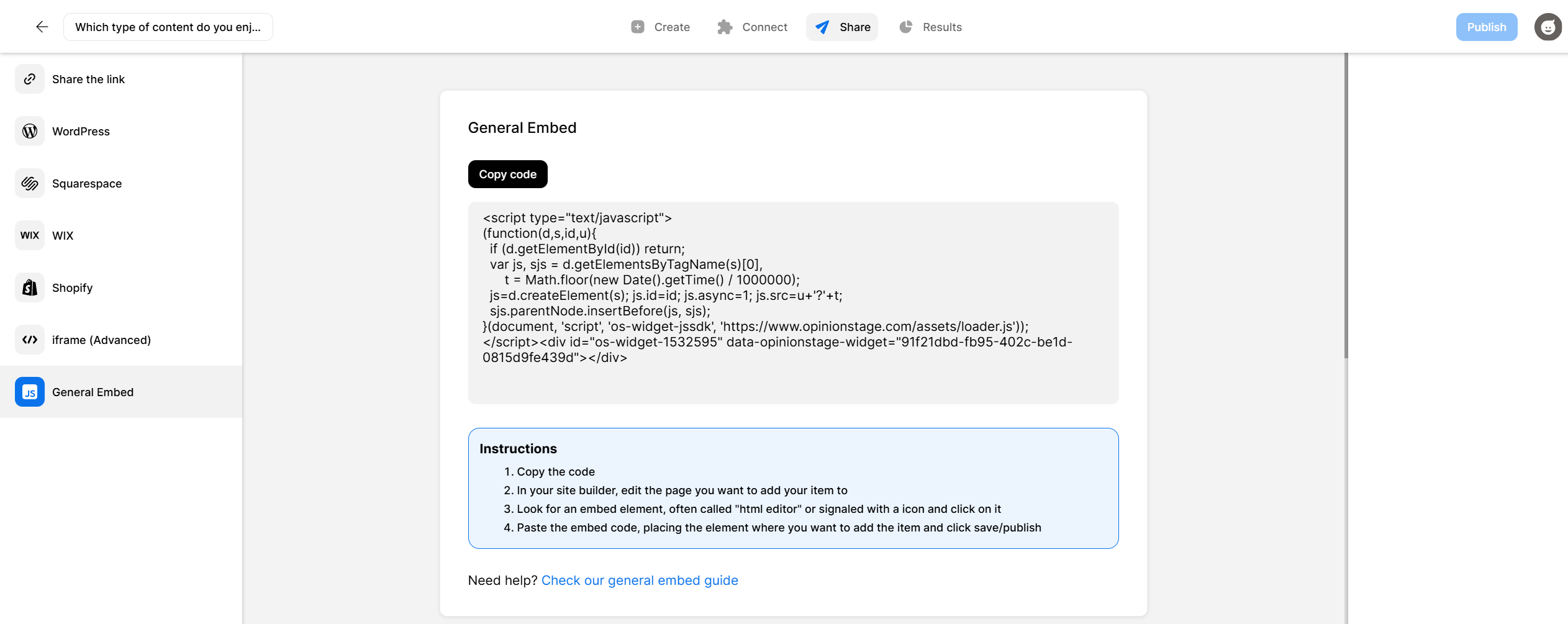
Click on the Share button that’s at the top of your screen and select the General Embed tab. Copy the poll code.
3. Add the HTML poll to your site
Now you can embed the online poll on your website. You can add it to a page, a post, the sidebar, or a pop-up. Simply paste the code where you want your poll to appear.
And now you’re done!
Why Create an HTML Poll?
Website polls are one of the easiest ways to turn passive visitors into active participants. Here’s how Opinion Stage customers are using them to drive real results:
Boost Engagement
Polls invite people to take part, not just scroll. A quick, well-timed question can spark opinions, reactions, and repeat visits. The best-performing polls tap into what people care about right now, whether that’s something topical, useful, or fun.
Get Fast Feedback & Insights
When you need answers quickly, polls deliver. Ask directly for opinions on a feature, design, or idea, or use responses to spot patterns and trends in your audience.
Drive Traffic From Social
A good poll gives people a reason to share. When the topic resonates, users naturally want to show their stance and see how others voted. That makes polls a simple way to bring more visitors to your site from platforms like Facebook and X.
Capture More Qualified Leads
Polls make lead generation feel natural. By adding a form right after someone votes, you’re reaching them at a moment of peak interest. Offer something worthwhile in return, like results, insights, or a discount, and you can turn engagement into high-quality contacts.
Run Contests & Competitions
Polls are an easy way to run contests where your audience votes to choose winners or favorites. Rank entries, build excitement, and manage everything with built-in controls like vote limits and automatic closing.
Increase Ad Revenue
Because polls keep people engaged, they also increase the chances they’ll interact with ads. Whether you place ads within the poll or around it, higher engagement often leads to stronger click-through rates and better overall performance. And if you’re on WordPress, the Opinion Stage poll plugin lets you add monetizable polls anywhere on your site without touching code.
Best Practices for Creating an HTML Poll
A great poll doesn’t just collect votes, it gets people to participate, think, and come back for more. Here’s how to make yours perform better:
Start With What Your Audience Cares About
The strongest polls feel relevant to the people answering them. Choose topics that invite opinions, reflection, or comparison. If you’ve already run polls, look at what performed best and double down on those themes.
Keep it Short & Easy to Answer
Simple wins. Clear wording and a focused set of answers lead to higher completion rates. Make sure options don’t overlap and cover the main possibilities. If something doesn’t fit, consider allowing an “other” option so users can still engage.
Use Visuals to Increase Attention & Engagement
Images and videos can dramatically improve participation. A strong visual helps people understand the question faster and makes the experience more engaging. Adding images to answers is especially effective for comparison-style polls.
Reveal Results After Voting
People are often motivated by curiosity. Keeping results hidden until someone votes encourages participation while maintaining interest. You can also add extra insights or context after the vote to increase value even further.
Choose a Color Theme That Matches Your Brand
Design matters. A well-matched theme makes your poll feel like a natural part of your site while still drawing attention. You can use built-in themes or customize styling so it aligns with your brand.
Place Your Poll Where People Will Actually See It
Visibility drives participation. Polls perform best when they’re placed in high-attention areas like within content, in sidebars, or as timed or exit popups. The easier it is to spot, the more responses you’ll get.
Want to do more with your poll? See all Opinion Stage’s poll maker features.
HTML Poll FAQs
How do I add a poll in HTML?
To add a poll in HTML, build your poll in a poll maker, copy the embed code it generates, and paste that code into the HTML of your page where you want the poll to appear. With Opinion Stage, the embed code is generated automatically when you click Share and then General Embed. There’s no JavaScript, no backend setup, and no manual coding required. The poll renders as a fully interactive widget with live results.
How do I put a voting poll on a website?
You can put a voting poll on a website by embedding it as a widget. Most poll makers generate a small snippet of HTML that you paste into your site’s source code, a CMS block, or a page builder. Opinion Stage’s HTML poll maker works on any website – plain HTML, WordPress, Wix, Squarespace, Shopify, and any platform that accepts embed code – and votes are stored automatically with results updating in real time.
Do I need to know HTML or coding to embed a poll?
No, you don’t need to know HTML or any coding to embed a poll on your site. Opinion Stage generates the embed code for you when you click Share and then General Embed. All you have to do is copy it and paste it into your page, post, or sidebar.
Where in my HTML page should I paste the poll code?
Paste the poll code into the HTML of your page wherever you want the poll to appear. This can be inside a content area, a sidebar widget, a pop-up block, or directly in the body of a blog post. Most users place polls inside an article (to drive engagement mid-read), in the sidebar (for site-wide visibility), or in a pop-up triggered on scroll or exit intent.
Other Ways to Collect Input on Your Site
A poll isn’t the only way to gather opinions and information from your visitors. Depending on what you’re trying to learn or collect, one of these might be a better fit:
- HTML Quiz: Interactive quizzes for engagement, lead generation, or product recommendations.
- HTML Survey: Visual and personalized surveys for structured research and customer feedback.