
Squarespace Quiz Maker & Builder: Embed in Minutes
Build personality quizzes, knowledge quizzes, or product recommendation quizzes with Opinion Stage and embed them on any Squarespace page. No code required.
- ✓ Free to use
- ✓ No credit card needed
How to Add a Quiz to Your Squarespace Site
Opinion Stage is the quiz maker Squarespace users rely on to add interactive quizzes to their sites. Since Squarespace doesn’t offer a built-in quiz feature, creators can easily embed Opinion Stage quizzes on any page with a single code snippet. Create personality quizzes, knowledge quizzes, or product recommendation quizzes with no developer needed.
1. Create a quiz
Start by creating a Squarespace quiz for your site. You can build it from scratch, pick from 100+ templates, or describe what you want and let the AI quiz builder draft it for you.

2. Copy the quiz code
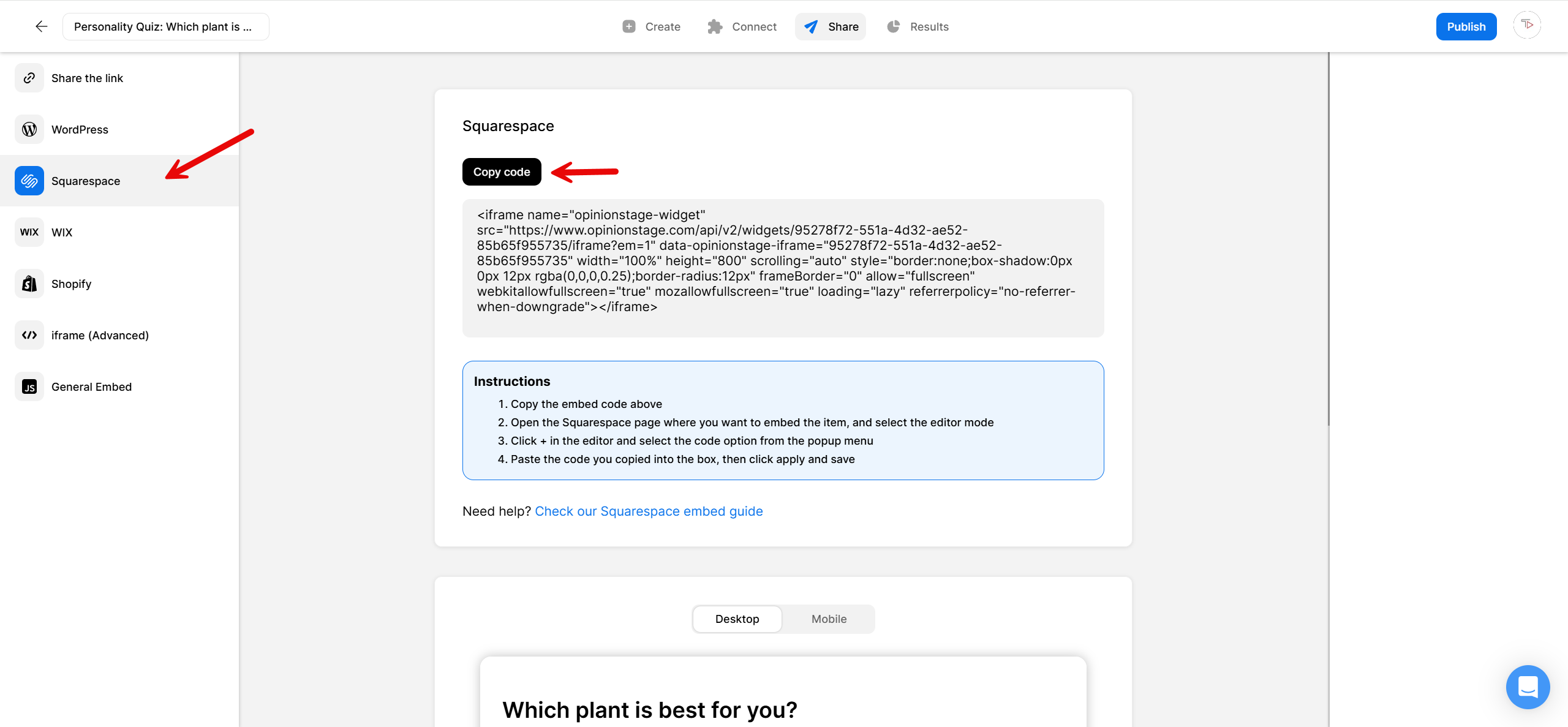
Click on the Share button at the top of your screen and then click on the Squarespace tab. Copy the embed code.
3. Add the quiz to Squarespace
You have two options for embedding it on your Squarespace site. You can either add it to a new page or embed it on an existing page. If you’d like to add your quiz to a new page, create the new page first, then follow the steps below to embed the quiz.
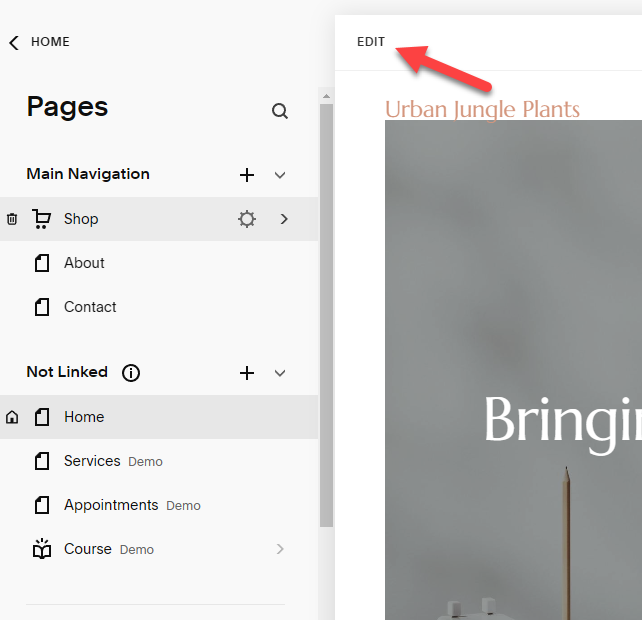
Start by clicking Edit at the top left-hand corner.
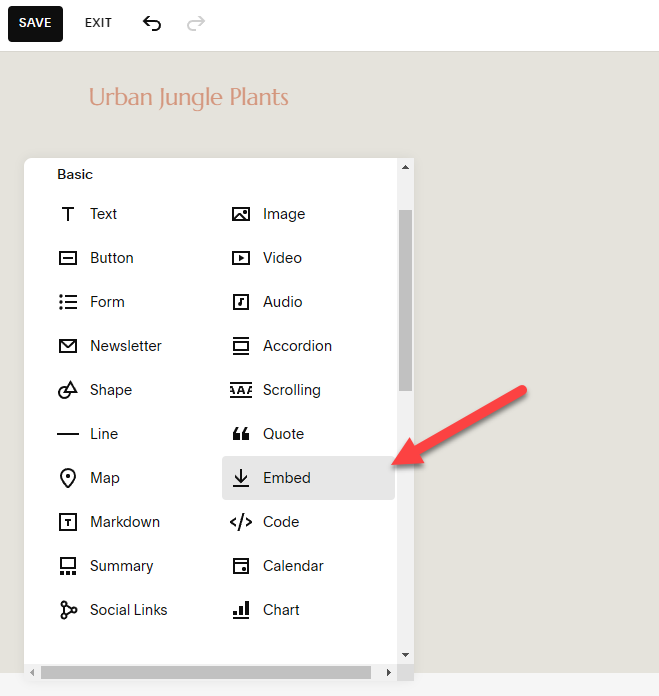
Then, click +Add Block on the left-hand side and scroll down to find the Embed button.
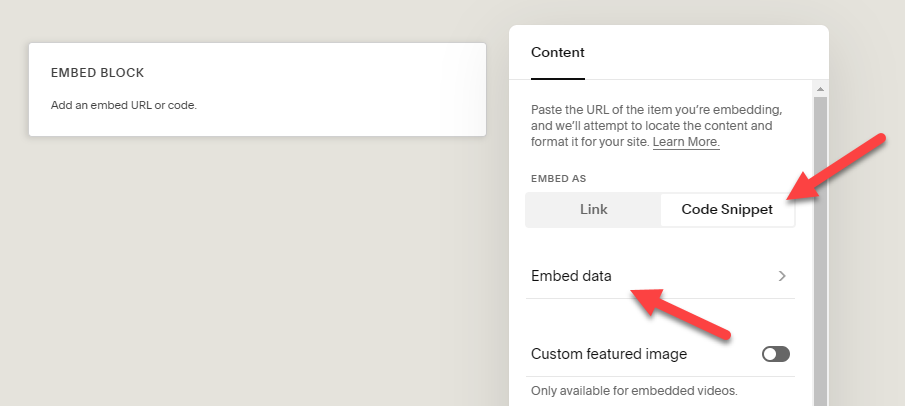
Squarespace will now add an embed block to the page. Double-click it to open up the Content menu. Next, click on Code Snippet and then Embed data.
Paste your quiz’s Squarespace embed code into the box. If you want to reposition your quiz, just click and hold, then drag it to where you want on the page. Don’t forget to click Save.
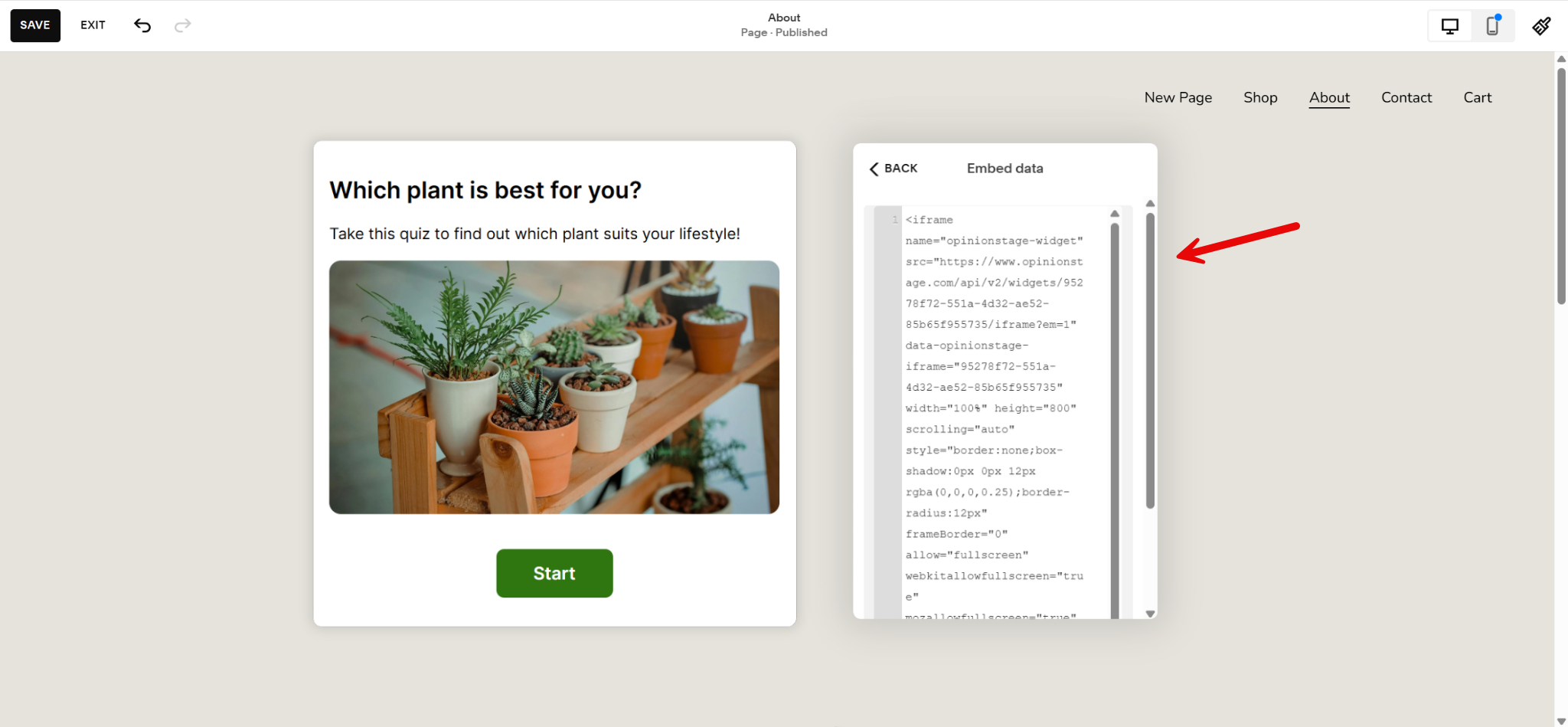
And now you’re done!
Why Add Online Quizzes to Your Squarespace Site?
From engaging visitors to collecting leads, here’s why your site needs a Squarespace quiz.
- Turn passive visitors into active ones: Instead of scrolling past your content, visitors answer a few questions and interact with your site. Quizzes consistently outperform static content when it comes to participation because they are interactive, feel more personal, and give people an immediate reason to continue through to the result. That extra engagement usually means more time on page, lower bounce rates, and better recall of your brand.
- Capture leads directly from your site: Add a lead form inside your quiz and collect emails alongside each visitor’s responses. That gives you more than just a contact list. You also learn what people want, need, or care about, which makes follow-up emails and offers much more relevant.
- Drive sales with product recommendation quizzes: If you sell on Squarespace, a product recommendation quiz can guide visitors to the best-fit product based on their needs or preferences. This removes decision fatigue, creates a more personalized shopping experience, and often converts better than sending everyone to the same product grid.
- Understand your Squarespace audience: See how people answer, where they drop off, and what trends appear across responses. These insights can help you improve your messaging, refine offers, and spot friction points on your site.
3 Types of Quizzes You Can Add to Squarespace
Personality Quiz
A personality quiz groups your visitors into types based on how they answer, think “Which [X] are you?” They’re great for keeping people on your Squarespace site longer, encouraging shares, and getting a clearer sense of who’s in your audience.
Knowledge Quiz
A knowledge quiz tests what your audience already knows. It’s a natural fit for turning learning into a game, running a contest, or adding a bit of challenge to your content.
Product Recommendation Quiz
If you sell on Squarespace, a product recommendation quiz helps shoppers find the right item without scrolling through your whole catalog. They answer a few questions, you point them to the product that fits, and you cut down on the indecision that leads to abandoned carts.
Opinion Stage Features for Squarespace Quizzes
A few of the features that come in handy when you’re building a quiz for your Squarespace site:
- AI quiz builder: Describe what you want and get a draft quiz in under a minute.
- 100+ templates: Start from ready-made quiz templates instead of a blank page.
- Lead capture: Add a lead form anywhere in your quiz and collect emails along with the answers each person gave.
- Full design customization: Colors, fonts, advanced customization (like custom CSS), and white label, so the quiz fits your Squarespace theme.
- 100+ integrations: Send responses to Mailchimp, HubSpot, Zapier, Google Sheets, or your CRM automatically.
- Real-time analytics: Track views, completions, drop-off, and answer breakdowns as responses come in.
See all Opinion Stage quiz maker features.
Squarespace Quiz Maker FAQs
Can you do a quiz on Squarespace?
No, you can’t do a quiz on Squarespace because the platform doesn’t have a quiz feature. You can, however, create a quiz using a quiz tool like Opinion Stage and embed it on your Squarespace website.
How can I see the results of my Squarespace quiz?
You can see the results of your Squarespace quiz by going to your analytics dashboard. Opinion Stage’s reports are updated in real time and you can use them to continue perfecting your content or engaging with your audience. If you want a deeper analysis of your results, you can export these reports to CSV/XLS files.
How do I embed a quiz in Squarespace?
You can embed a quiz in Squarespace by clicking ‘Edit’ at the top-left hand corner of the page you want to add the quiz to and then clicking ‘+Add Block’ to add an embed block. Paste your copied Squarespace embed code into the box and that’s it!
What kind of integrations can I connect to my Squarespace quiz?
The Opinion Stage quiz builder allows you to connect your Squarespace quiz to your CRM, email, or marketing automation system. This is an easy way to collect answers, submissions, email addresses, and user details in real-time.
You can also connect integrations such as Mailchimp, HubSpot, custom webhooks, API, Zapier, and more. To boost your remarketing and conversion efforts, you can set up Facebook and Google pixels.
Is Opinion Stage free to use with Squarespace?
Yes. Opinion Stage has a free plan with unlimited quizzes, unlimited questions, AI quiz generation, and lead capture, all embeddable on Squarespace with no credit card required. Paid plans add advanced features like advanced customization, white labelling, and higher response volumes.
Can I collect leads from a Squarespace quiz?
Yes. You can add a lead form anywhere in your quiz and collect leads along with their full answer context. Leads flow into your Opinion Stage dashboard and can sync automatically to Mailchimp, HubSpot, Zapier, Google Sheets, or your CRM. You can also set up email notifications for every new submission.
Other Ways to Engage Your Squarespace Audience
A quiz isn’t the only way to get your Squarespace visitors involved. Depending on what you’re trying to learn or collect, one of these might be a better fit:
- Squarespace Poll: Quick, one-question polls for fast audience feedback.
- Squarespace Survey: Longer-form surveys for structured research and customer feedback.
- Squarespace Form: Sign-up forms, contact forms, registrations, and more.