
Add a Joomla Quiz to Your Site In Minutes
Learn how to create a quiz using Opinion Stage’s quiz maker and add it to your Joomla site quickly and easily. Increase engagement, boost traffic, and get to know your audience better.
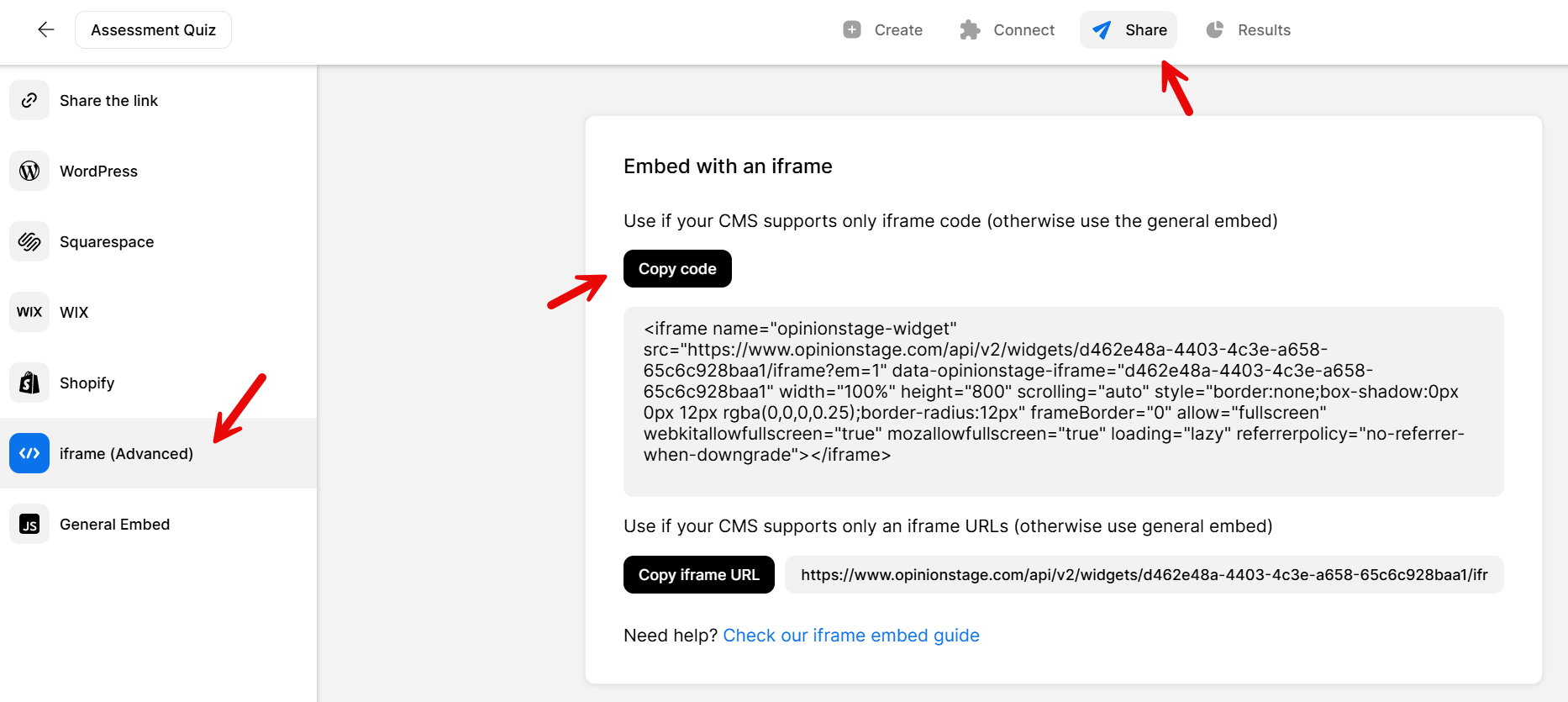
2. Copy the iframe code
Next, you need to copy the code by clicking on Share at the top of your screen and then selecting iframe (advanced) on the left side.
3. Go to Joomla
Before you add your quiz, you need to make sure iframes are allowed. To allow iframes in Joomla, open your Joomla admin dashboard. At the top, click on Extensions and then select Plug-in Manager. In the left menu, there’s a filter. Click Select Type and then editors. You’ll see a list of results. Click Editor – TinyMCE. Scroll down to Prohibited Elements and remove iframe from the list so it reads: script, applet. Don’t forget to click Save. Now open the HTML editor within the TinyMCE editor and paste the iframe code you previously copied.
That’s it, you’re done!
Recommendations for Creating a Joomla Quiz
Follow these recommendations to make your Joomla quiz extra engaging and exciting for your audience.
Make It Appealing to Your Audience
Keep your audience in mind when selecting the quiz’s main title to verify it is exciting and interesting for your target audience.
Add Visuals
Add images to the quiz cover and questions to spice it up. This will maximize the number of participants your quiz gets.
Select a Good Length
We recommend creating anywhere between 5-15 questions so that the quiz is interesting enough on the one hand but not too long on the other.
Place in a Prominent Location
Verify your quiz is noticed by placing it in the main section of the site, above the fold if possible. Another option is to locate it in an enter/exit popup.
Read more on the quiz maker page.
For qualitative research and quantitative data collection consider using a Joomla survey or Joomla form. Due to their fun design, accessibility, and personalization options, they get more and better answers than regular forms and surveys. If you want to engage your audience with one quick question, make a Joomla poll.
You can easily do it yourself, no need for a developer
Create a Quiz