
Wix Survey Maker & Builder: Embed in Minutes
Build visual, engaging, and personalized surveys with Opinion Stage and embed them easily on any Wix page. Just copy and paste. No code and no Wix App Market install needed.
- ✓ Free to use
- ✓ No credit card needed
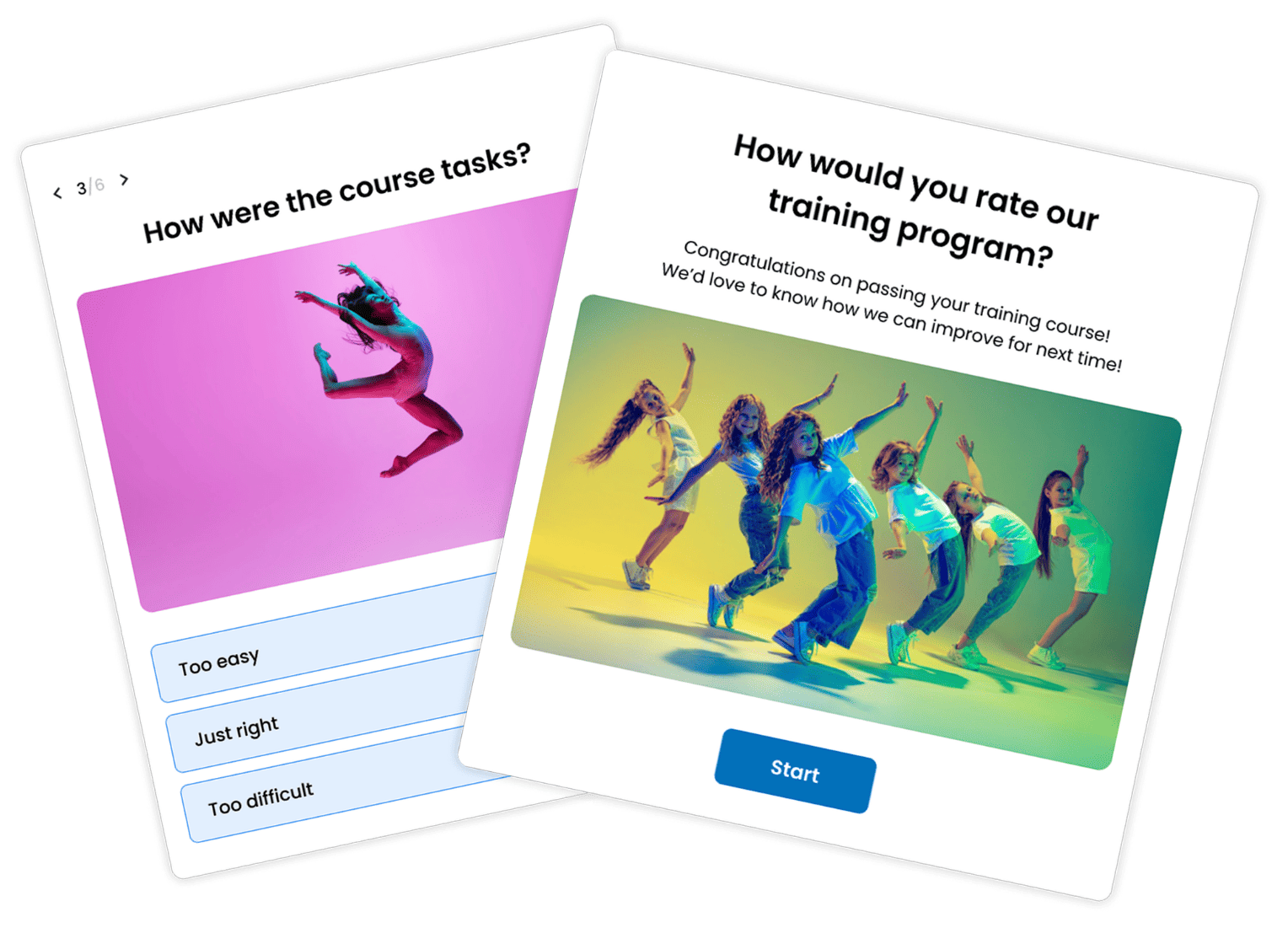
How to Add a Survey to Your Wix Site
Opinion Stage lets you add visual and interactive surveys to any page on your Wix site. Wix doesn’t have a native survey product for regular pages. Its built-in survey feature only works inside the Online Programs product, so Wix questionnaires live inside a course rather than on your homepage, blog, or landing pages.
To add a survey to a regular Wix page, most people use an external tool like Opinion Stage and embed it with Wix’s HTML element. With a survey maker like Opinion Stage, you can build customer feedback surveys, NPS surveys, market research surveys, and post-purchase surveys that are engaging and personalized to each respondent.
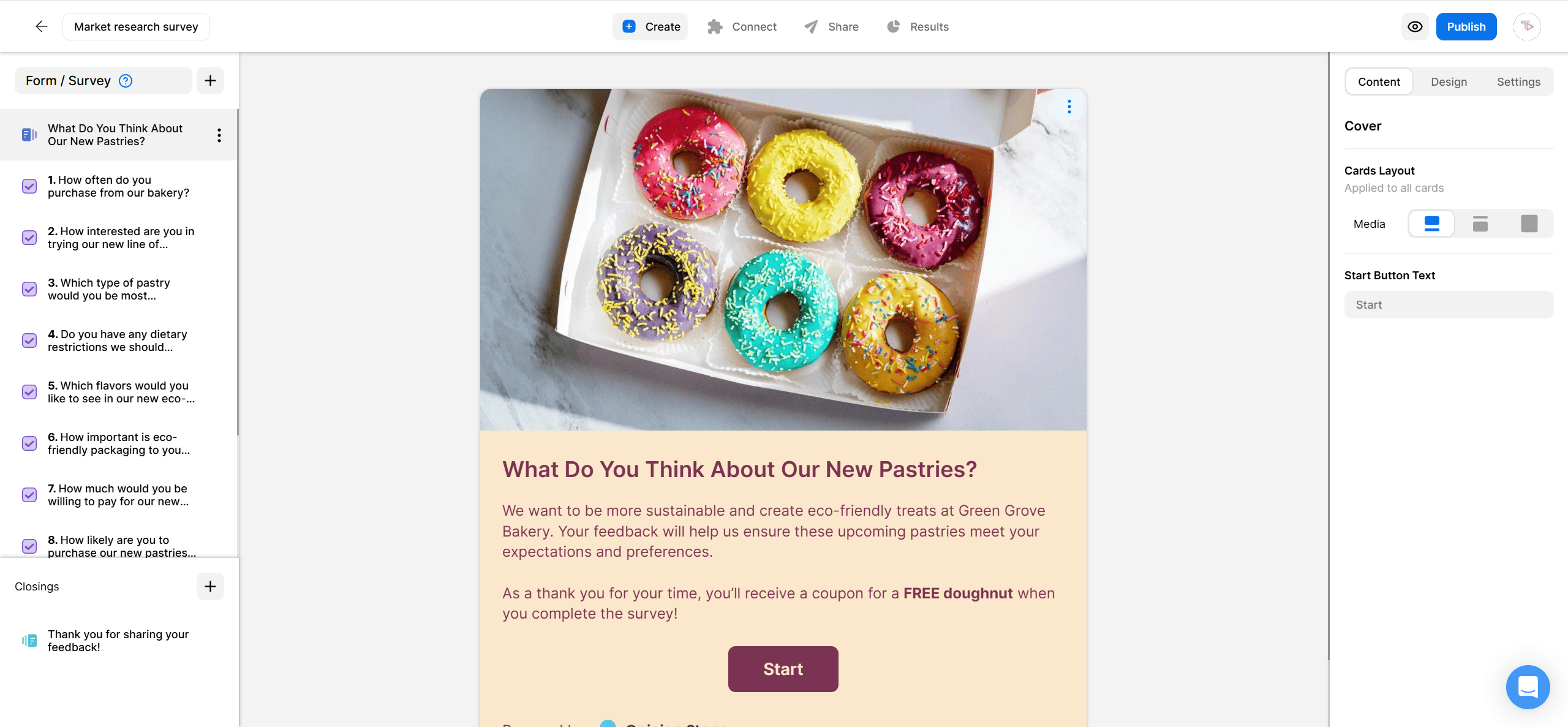
2. Copy the embed code
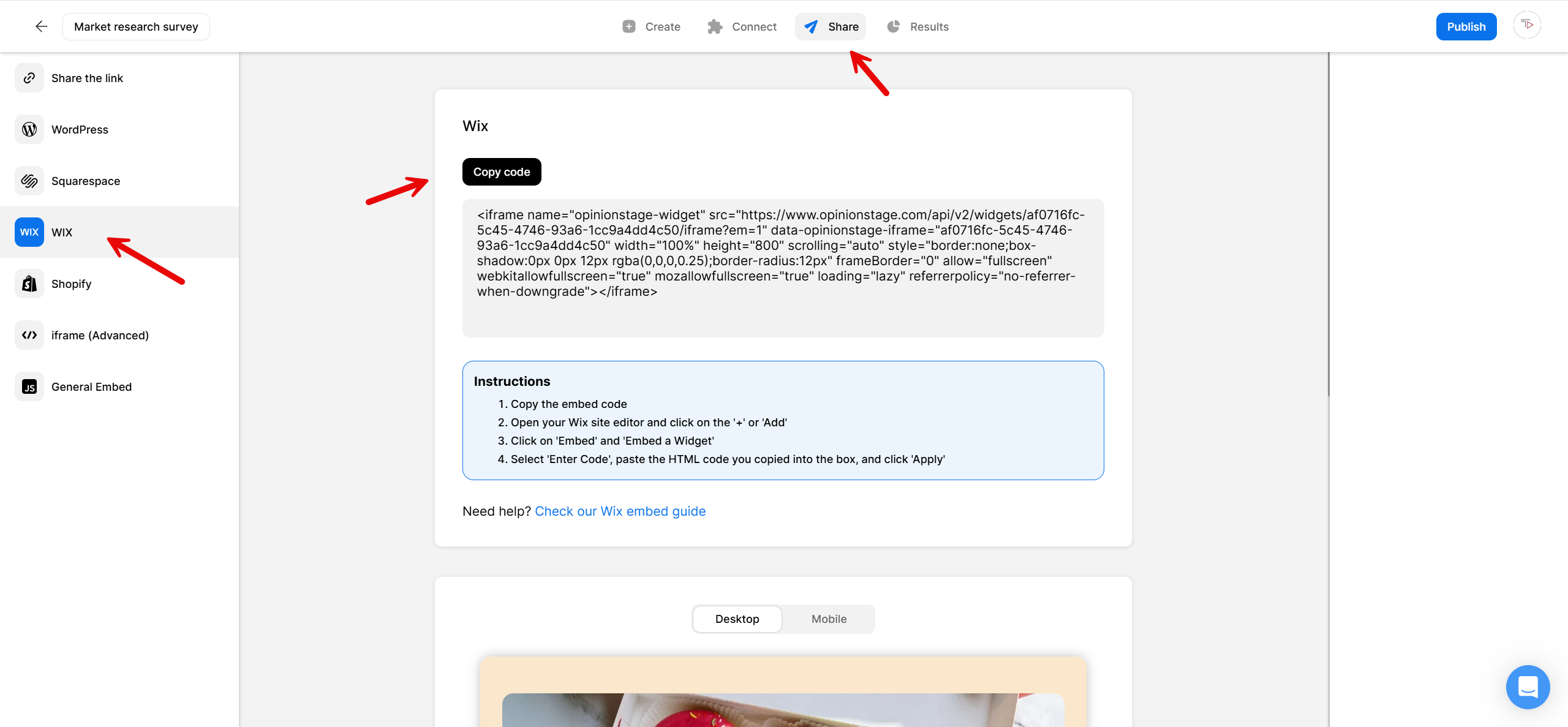
Next, click on the Share button located at the top and then select the Wix tab. Copy the code.
3. Go to Wix
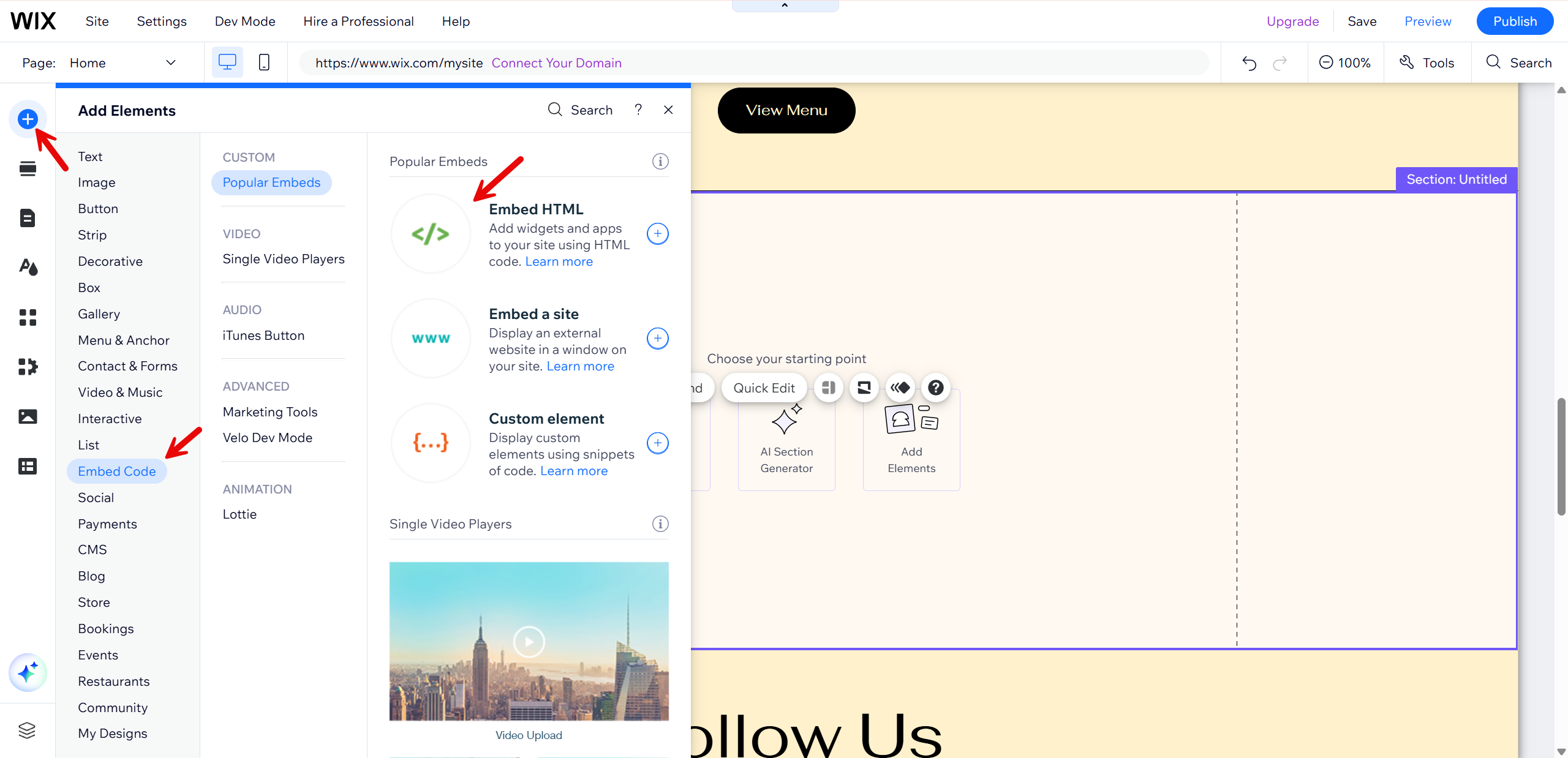
Go to your Wix website. Click the + button, located at the top-left. Click on Embed Code and then Embed HTML.
4. Paste the survey code
A box will appear. Paste the code you copied earlier into the text box and click Update. Don’t forget to click Publish to save your work.
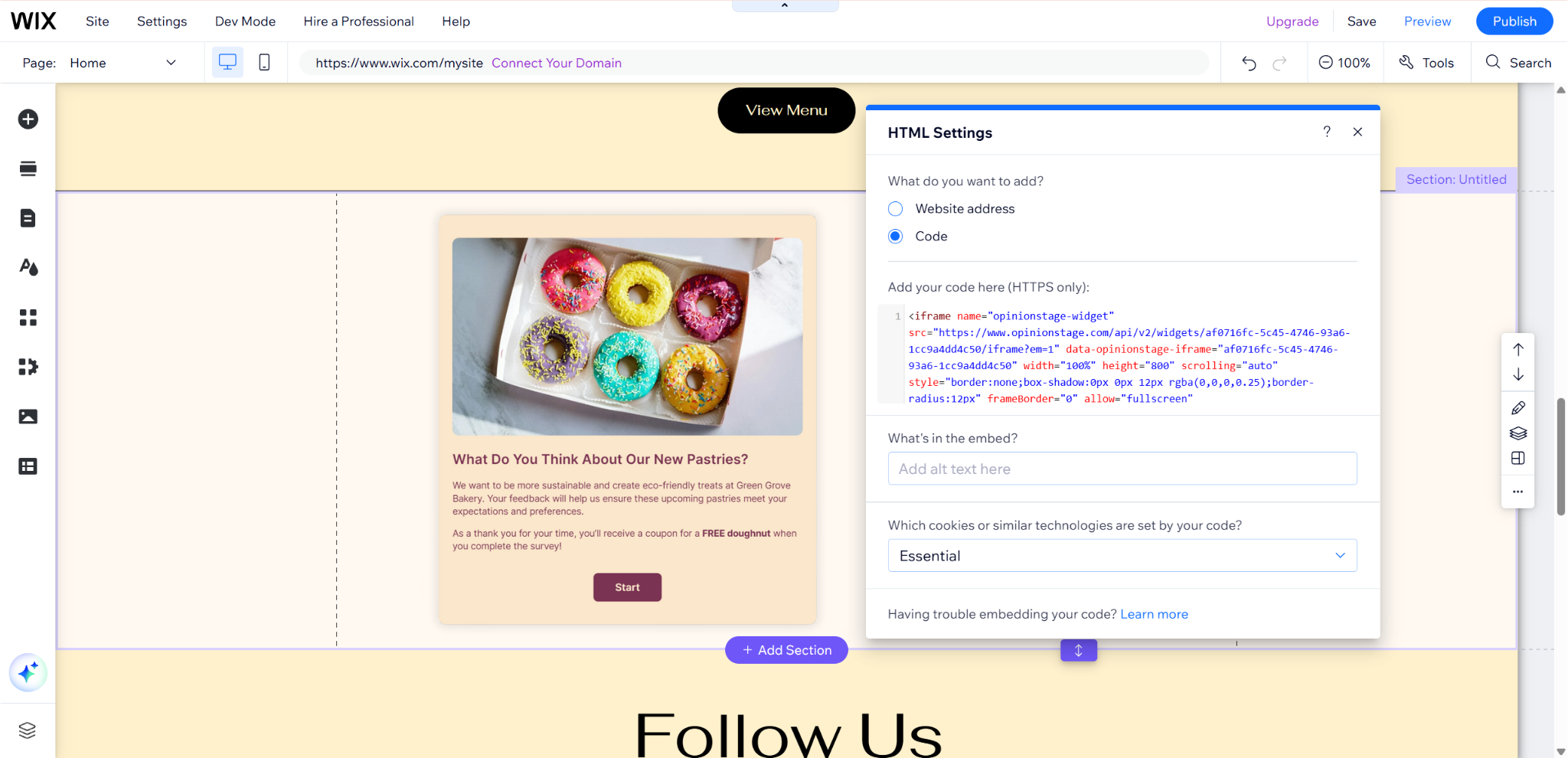
And now you’re done!
Why Add Online Surveys to Your Wix Site?
From customer feedback to market research and product decisions, here’s why your site needs a Wix survey.
Get Real Answers From the People Already on Your Site
There’s a lot you can learn from your Wix visitors that page views and clicks don’t show you. A survey helps you close that gap by asking directly. You can use it to test a new offer before launch, understand why visitors aren’t converting, or uncover what your audience actually wants you to build next so you can make more informed decisions.
Higher Completions With Visual, Engaging Surveys
Opinion Stage surveys are designed to feel more engaging and easier to complete. They use visuals like images and videos in questions and answers, and present one question at a time to keep things focused. This creates a smoother experience for visitors that leads to more completions.
Personalize Each Respondent’s Experience
Skip and branch logic lets you tailor the survey to each person based on how they answer. A first-time visitor and a returning customer don’t need to see the same questions, and follow-up questions only appear when they’re relevant. Each respondent sees a shorter, more focused set of questions, which keeps the experience smooth and helps you collect cleaner, more useful data.
Capture Leads Alongside Feedback
Add a lead form to your survey and collect emails together with each visitor’s full set of answers. That means every contact comes with built-in context, what they’re interested in, what they need, or how they think. You can use that insight to segment your audience, personalize follow-ups, tailor offers, or prioritize the most relevant leads. Instead of a generic list, you end up with contacts you can act on right away.
Opinion Stage Features for Wix Surveys
A few of the features that come in handy when you’re building a survey for your Wix site:
- Visual surveys with images and video: Add images, GIFs, and videos to your questions and answers to make the survey more engaging and easier to understand.
- One question at a time: Show questions one at a time to reduce survey fatigue and encourage completion.
- Skip & branch logic: Personalize the survey path based on each answer, so respondents only see the questions that are relevant to them.
- AI survey builder: Describe what you want to ask and get a survey in under a minute.
- 100+ templates: Start from a ready-made Wix survey template – customer feedback, NPS, market research, brand awareness, or post-purchase – instead of a blank page.
- Lead capture: Add a lead form and collect emails along with the answers each person gave.
- Full design customization: Colors, fonts, advanced customization (like custom CSS), and white label, so the survey fits your Wix theme.
- Works with Wix’s HTML element on any page: Embed your survey on Wix landing pages, blog posts, product pages, or anywhere else Wix supports the standard HTML element. No developer or App Market install needed.
- 100+ integrations: Send responses to Mailchimp, HubSpot, Zapier, Google Sheets, or your CRM automatically.
- Real-time analytics: Track views, completions, drop-off, and answer breakdowns as responses come in.
See more Opinion Stage survey maker features.
Wix Survey Maker FAQs
Does Wix have a survey tool?
Yes, but there is a catch. Wix has a built-in survey feature inside its Online Programs product, but those surveys only work inside a course or program. They’re designed for course assessments rather than customer feedback or research on your main site. To add a survey to a regular page on your Wix site (a landing page, a blog post, your homepage, a product page), the standard approach is to create the survey with a tool like Opinion Stage and embed it using Wix’s HTML element. Scroll to the top of this page for the step-by-step.
Can you do surveys on Wix?
Yes, and there are a few ways to do it. Wix’s Online Programs has a built-in survey feature for use inside courses. For surveys on regular Wix pages, you can install a survey app from the Wix App Market, or embed an external survey tool using Wix’s HTML element. That last option is how Opinion Stage works on Wix, and it’s a good fit when you need a visual, one-question-at-a-time survey with branching logic and lead capture. The right choice comes down to where the survey needs to live and how much you want to customize it.
What is the best platform to create a survey on Wix?
Opinion Stage is a strong fit for most Wix users because it’s free to start, doesn’t require a developer, and works with Wix’s standard HTML embed element. You can build NPS surveys, customer feedback surveys, market research surveys, and post-purchase surveys, with skip logic and branching to personalize the experience for each respondent. The right Wix survey builder depends on your goals, but for visual, engaging surveys with higher completion rates than a standard form, Opinion Stage covers the common needs without locking you into a paid plan to access core features.
How do I embed a survey in Wix?
You embed a survey in Wix by clicking the + button in your Wix editor, choosing Embed Code, then Embed HTML. Paste the survey embed code from Opinion Stage into the HTML box, click Apply, and drag the container to where you want it on the page. The full walkthrough with screenshots is at the top of this page.
What's the difference between a Wix form and a survey?
A form is used to collect transactional details like contact requests, signups, or orders. A survey is designed to collect opinions, feedback, or research. If you just need basic info like name and email, a form does the job. But if you’re trying to understand customer satisfaction, run NPS, do market research, or gather product feedback, a survey is a much better fit.
How do I view and export survey responses from a Wix survey?
When you create a survey with Opinion Stage and embed it on your Wix site, responses go to your Opinion Stage analytics dashboard, not to Wix. From there you can view individual responses, see aggregated charts and breakdowns, filter by question or answer, and export everything to CSV or Excel. You can also send responses automatically to Google Sheets, Mailchimp, HubSpot, or your CRM through built-in integrations or Zapier, so your team can analyze data wherever it already works.
Can I collect leads from a Wix survey?
Yes, and it’s included in Opinion Stage’s free plan. You can add a lead form to your survey and collect emails alongside each visitor’s full answer context. The leads you collect can sync automatically to Mailchimp, HubSpot, Zapier, Google Sheets, or your CRM. You can also set up email notifications for every new submission. Paid plans add advanced features such as higher response volumes.
Can I use Opinion Stage instead of SurveyMonkey or Google Forms on Wix?
Yes. Opinion Stage is commonly used as an alternative to SurveyMonkey, Google Forms, and Typeform for Wix sites, especially when you want a user-friendly builder and an engaging, interactive survey. You can match the look of your survey to your Wix theme, add images and video to questions, personalize the path with branching logic, and collect leads alongside responses.
Other Ways to Engage Your Wix Audience
A survey isn’t the only way to get your Wix visitors involved. Depending on what you’re trying to learn or collect, one of these might be a better fit: