Zero-Party Data: What It Is & How to Collect It With Quizzes

Zero-party data is information people willingly share with a brand, like their preferences, goals, budget, or plans to buy. Rather than trying to piece it together from their clicks or buying it from someone else, you get it straight from the source. Often, they share it because they get something in return, whether that’s a more relevant recommendation, useful content, or a better experience. (The term was coined by the research firm Forrester.)
Why does it matter? Knowing what people are actually interested in makes it easier to segment your audience and tailor your follow-up to their needs, rather than sending everyone the same message. It gives you a better starting point for building relationships and making more relevant offers. And as privacy regulations evolve and tracking becomes less reliable, information people share directly with you becomes even more valuable.
In this guide, we’ll look at how zero-party data compares to first-, second-, and third-party data, what it looks like in practice, and how to collect it yourself using quizzes.
Zero-Party vs. First-, Second-, & Third-Party Data
Quick refresher: marketers usually sort customer data into four types, depending on who collects it and how. Here’s how they compare:
| Type | Where it comes from | Example | How reliable it is |
|---|---|---|---|
| Zero-party | The customer shares it with you on purpose | A shopper answers “sensitive skin” in a skincare quiz | High. It’s in their own words, though it can change over time |
| First-party | You observe behavior on your own site, app, or emails | Pages viewed, purchases, email clicks | High for what people did, but you have to guess why |
| Second-party | Another company’s first-party data, shared through a partnership | A hotel chain sharing guest data with an airline partner | Depends on the partner and how the data was collected |
| Third-party | Companies with no direct relationship to the person, usually sold as audience segments | A purchased list of “likely home buyers” | Lowest. Often broad, dated, and harder to use under privacy rules |
What’s the Difference Between Zero-Party & First-Party Data?
Both come straight from your own customers, so they’re easy to mix up. Here’s the simple way to think about it: first-party data is what people do. Zero-party data is what they tell you.
Say someone looks at three pairs of running shoes on your store. That’s first-party data. You know they’re into running shoes, and that’s about it. Now say they tell you they’re training for their first marathon, mostly run on trails, and want to spend under $150. That’s zero-party data, and suddenly you know exactly which shoe to show them next.
Some people treat zero-party data as a subset of first-party data, and that’s fine. What matters is using both together: behavior shows you what people are doing, and their answers tell you why.
Zero-Party Data Examples
So what does zero-party data actually look like? Here are six common types, plus a question you could use to ask for each one:
- Product preferences. Style, size, skin type, flavor, or fit. “How would you describe your skin?”
- Budget. A price range, so you recommend things people can actually buy. “What would you like to spend?”
- Purchase timeline. Buying now, soon, or just researching. “When are you planning to buy?”
- Goals. What they want to achieve, from a fitness goal to a business result. “What’s your main goal for the next three months?”
- Content interests. The topics they want to hear about. “Which of these topics would you like tips on?”
- Communication preferences. How often, and through which channel, they want to hear from you. “How often would you like to get emails from us?”
Notice that you can’t reliably guess any of these from behavior. Someone browsing your priciest products might have a big budget, or might just be window shopping. Asking is the only way to know for sure.
Why Collecting Zero-Party Data Is the Hard Part
Here’s the tricky part: defining zero-party data is easy, but getting people to share it is another story. Most people aren’t eager to fill out a long preference form or dig through a brand’s emails to update their settings. Ask for their budget, goals, or buying timeline on a typical lead generation form, and it can quickly feel like a chore.
People are more willing to answer when there’s something in it for them. A product recommendation, a personality result, a score, or a personalized plan gives them a reason to engage, and their answers help shape the outcome. That’s exactly what a good quiz does.
How to Collect Zero-Party Data With Quizzes
A quiz takes the questions you’d love to ask and turns them into something people actually want to answer. It can bring up to 5X more leads than a regular lead form, and every one of those leads comes with answers you can put to work right away. Here’s how to set one up in four steps.
1. Pick the quiz type that fits your goal
Start by creating a quiz, and choose the format based on the data you need most:
- Product recommendation quiz. “Which serum is right for your skin?” Collects preferences, needs, and budget, and ends with products to buy. A natural fit for ecommerce. Here’s more on how a product recommendation quiz works.
- Personality or style quiz. “What’s your home decor style?” Collects tastes and preferences in a format people enjoy sharing. Good for brand marketers.
- Lead quiz or assessment. “How ready is your marketing to scale?” Collects goals, budget, and timeline, so you can qualify leads before a sales call. Good for B2B and service businesses.
- Quick poll. “Which product should we bring back?” One question, one preference. It takes seconds to answer, so it works well inside a blog post or email.
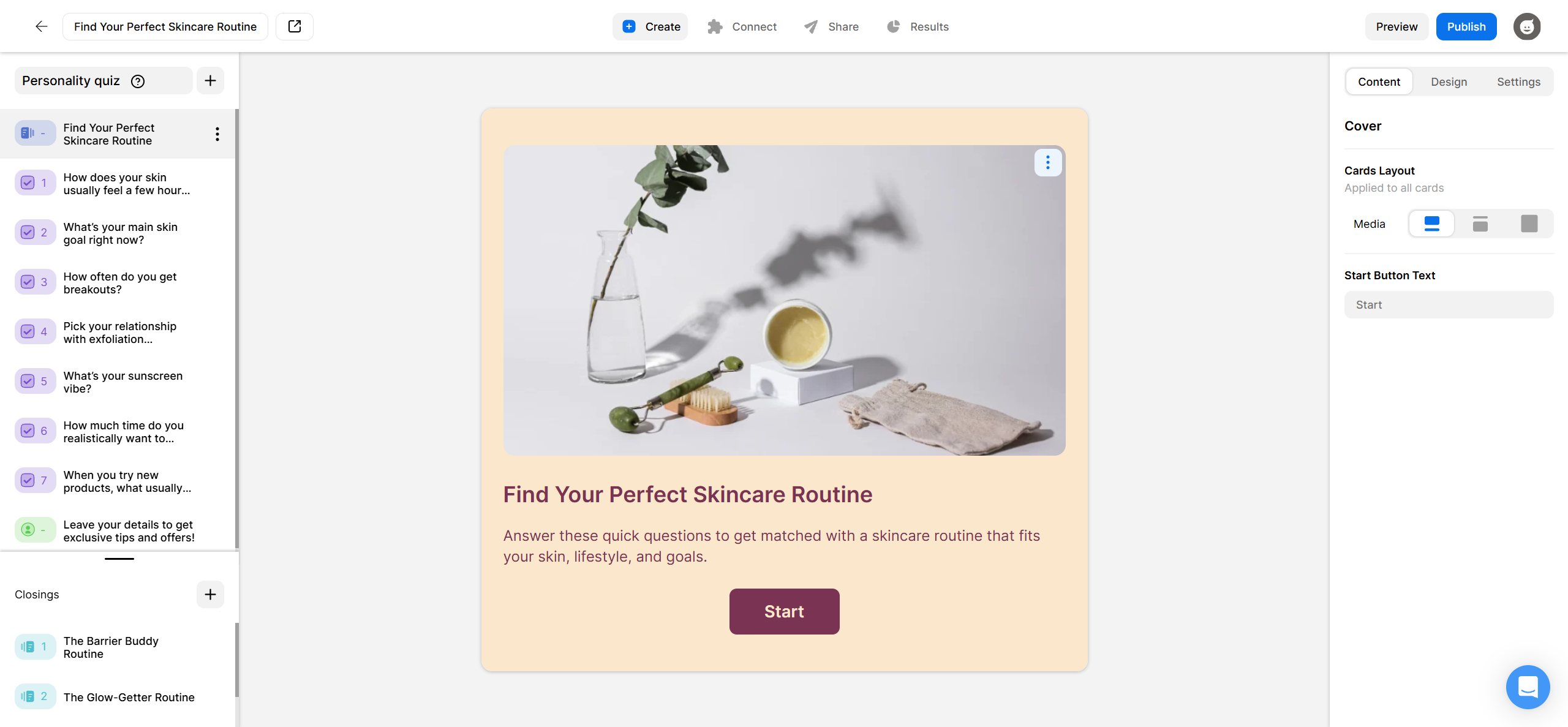
Example: a skincare personality quiz in Opinion Stage. Seven quick questions collect skin type, goals, and routine preferences, and the lead form comes right before the personalized routine result.
2. Map every question to a data field you’ll use
Here’s a simple rule: before you write a question, decide what you’ll do with the answer. If it won’t change which product you recommend, which list someone joins, or which email they get next, cut it. Five to eight questions is usually plenty, and shorter quizzes are easier to finish.
Here’s what that looks like for a skincare brand:
| Quiz question | Data field | How you use it |
|---|---|---|
| What’s your main skin concern? | Skin concern | Which product line to feature in follow-up emails |
| What would you like to spend on a routine? | Budget range | Which price tier to recommend |
| When are you planning to buy? | Purchase timeline | Send an offer now, or start a nurture sequence |
| How often would you like skincare tips? | Email frequency | How often to email this person |
3. Ask for the email at the result
Put the lead form right before the result, not at the start. By that point, people have answered your questions and really want to see their result. Then tell them exactly what they’ll get: “Where should we send your personalized routine?” beats “Sign up for our newsletter” every time.
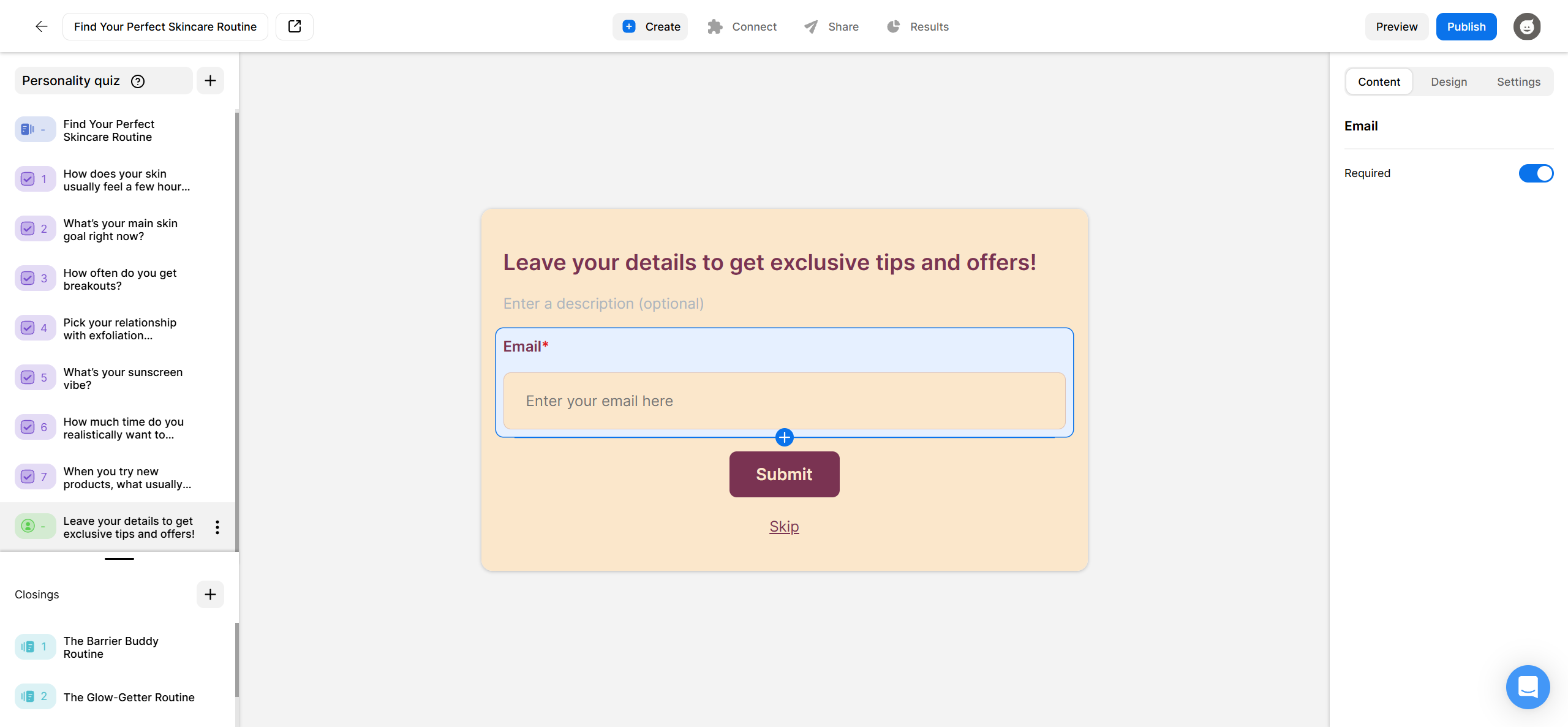
Example: the lead form sits right before the result and asks only for an email, with an optional skip.
Keep the form short. Name and email are usually enough, because the quiz answers already give you the rest. Add a clear opt-in for marketing emails so your consent is on record.
4. Send answers to your CRM & segment by result
Collecting the data is only half the job. It pays off when it lands in the tools you use for follow-up. Opinion Stage sends each lead, together with their quiz answers, to your CRM or email marketing platform through native integrations such as Mailchimp, plus Zapier (for HubSpot and thousands of other tools) and webhooks.
Quick tip: map each answer to a real field or tag, not a notes field, so you can actually filter and segment by it. Then give each result its own follow-up. Someone whose result is “dry skin, ready to buy” gets a product offer this week. Someone who’s “just researching” gets a short series of tips first. Same traffic, much more relevant emails.
You don’t have to build any of this from scratch. Start from a lead generation quiz template or let AI draft the quiz from your idea (included on the free plan), then embed it on your site or share a link. It’s live in minutes, no developer needed. For a B2B version of the same approach, see our quiz-first playbook for agency lead generation.
Tools for Collecting Zero-Party Data
Good news: you don’t need a big, expensive data platform to get started. Most zero-party data comes in through three kinds of tools, and plenty of marketers use more than one:
- Quizzes and polls collect preferences from new visitors in exchange for a result. Opinion Stage is a quiz and poll maker built for this: create a quiz from a template or with AI, embed it on WordPress, Squarespace, Wix, or Shopify, and send every answer to your CRM or email platform. Surveys and forms are included.
- Preference centers let existing subscribers choose their topics and email frequency. They’re usually part of your email platform. Useful for keeping data up to date, but new visitors rarely see them.
- Surveys work for longer, research-style questions to existing customers, such as a post-purchase survey. Better for feedback than for capturing new leads.
If you’re just starting out, keep it simple: a quiz to collect zero-party data from new visitors, and a preference center so subscribers can update it later.
Privacy & Consent
People are trusting you with this information, so make it easy for them to keep trusting you:
- Ask clearly. Make it obvious why you’re asking each question. Usually, it’s to give a better result.
- Explain how you’ll use the data. Link to your privacy policy next to the lead form, and keep marketing consent as a separate opt-in.
- Let people update their answers. Preferences change. A preference center link or a chance to retake the quiz keeps your data current.
- Only collect what you’ll use. Every extra question costs you answers and adds data you’re responsible for.
On our side, Opinion Stage is GDPR and CCPA compliant and encrypts data in transit and at rest. Your own consent text and privacy policy still cover the data you collect, so make sure they’re up to date.
The Bottom Line
Zero-party data is some of the most useful data you can have, because it comes straight from your customers. The hard part has always been getting people to share it. Give them something worth answering for, like a quiz with a personalized result, and they’ll happily tell you what they want. Then all that’s left is using it to send them the right thing at the right time.
FAQ
Zero-party data is information a customer intentionally shares with a brand, such as preferences, goals, budget, or purchase timeline. It is collected by asking, for example through a quiz or poll, rather than by tracking behavior or buying data.
First-party data is what customers do on your channels, like pages viewed or purchases. Zero-party data is what they tell you directly, like their goals or preferences. First-party data shows behavior, and zero-party data explains the reasons behind it.
Zero-party data (shared intentionally by the customer), first-party data (collected from behavior on your own channels), second-party data (another company’s first-party data, shared through a partnership), and third-party data (collected by companies with no direct relationship to the customer).
Common examples include product preferences such as style or skin type, budget, purchase timeline, goals, content interests, and how often someone wants to hear from you.
Ask questions people want to answer because they get something back, such as a product recommendation quiz, a personality quiz, or a quick poll. Ask for the email right before the result, then send the answers to your CRM or email platform to segment follow-up. With Opinion Stage, you can build a quiz like this in minutes from a template or with AI.
Start Collecting Zero-Party Data With a Quiz